June 17th, 2026
Does Internal Linking Help SEO? A Practical Guide for SaaS Sites
 WD
WDWarren Day
You've heard that internal linking matters. Every article says "link relevant pages" and then just... leaves you there.
For a SaaS site, the question of does internal linking help SEO isn't really a philosophical one. It's mechanical. When you treat it like a control system, it becomes your most direct way to get deep feature pages indexed, get pricing in front of crawlers, and lift organic traffic by double digits in a few weeks.
Most advice fails because it's too generic to act on. What you actually need is a framework that treats internal linking as a system for controlling crawl budget and distributing authority. Something you can execute in a focused sprint, not some vague ongoing project.
That's what this is. A four-step framework, based on case studies showing 34% traffic increases from just 12 strategic links. You'll map your site hierarchy, deploy your first 12 targeted links, run a controlled pilot, then scale to a cluster-based architecture.
By the end, you'll have a prioritized checklist and a test plan you can start on immediately.
Audit Your Current State: Prerequisites & Baseline
Before you add a single link, you need to know what you're working with. Internal linking isn't about sprinkling "SEO juice", it's a mechanical system, and you can't control what you haven't mapped.
First, get your tools in order. You'll need:
- Direct access to your CMS (WordPress, Webflow, etc.) to edit content.
- Google Search Console for crawl coverage, impressions, and click data.
- Google Analytics 4 for baseline organic traffic and conversion metrics.
- A crawl tool like Screaming Frog's SEO Spider. The free version handles 500 URLs, which is enough for most early-stage SaaS sites. This tool will map your entire link structure.
Then run your baseline audit. Export all internal links from your crawl tool and look for two things:
- Orphaned pages: Pages with zero internal links pointing to them. Google's crawler will never find them. One study found that linking new content from hub pages reduces indexing time from weeks to just 30–120 minutes [Source: worldreach.io].
- Click depth: How many clicks does it take to reach your pricing page? Your sign-up flow? Pages buried past 2–3 clicks get noticeably less crawl attention.
Next, find your 5–10 "Authority Pages." These are the pages already doing the work, strong external backlinks, solid domain ratings, consistent rankings. For most SaaS sites that's the homepage, the primary product page, and maybe a couple cornerstone blog posts driving real traffic.
These pages become your distribution hubs. Everything flows from them.
Last thing: set up a simple tracking spreadsheet before you touch anything. Log current organic traffic (GA4), impressions and clicks (GSC), and keyword rankings for every page you're targeting.
Sites that run regular internal link audits see an average 23% increase in organic traffic within six months [Source: upwardengine.com]. But you won't know if you're one of them unless you have a baseline to compare against.
How Internal Linking Works as a Mechanical System
Internal linking isn't magic. It's a mechanical control system for two things: discovery and ranking.
Mechanism 1: Crawl & Indexation (Discovery) Internal links are a crawl directive. Search engines follow links to find content. Without them, new or deep pages become orphans and may go unindexed for weeks. Pages accessible within 2–3 clicks get priority crawling; pages buried 6–7 levels deep get crawled less often [Source: clickrank.ai].
Linking from a hub or high-authority page acts as a direct signal, pulling crawlers to your target. One case study reduced indexing time for new pages from 24 hours to 30–120 minutes after optimisation [Source: worldreach.io].
Mechanism 2: Authority Distribution (Ranking) Internal links pass PageRank (or "link equity"), which influences rankings by routing authority from pages that have it to pages that need it. For SaaS sites, that means channelling authority from link-earning blog content to revenue-driving product, pricing, and feature pages.
The Screaming Frog test showed that adding just 12 strategic links improved average position from 8.7 to 4.2 and boosted organic traffic by 34% [Source: screamingfrog.co.uk].
So, does internal linking help SEO rankings? Yes, directly via authority flow. Does internal linking improve SEO? Yes, by solving two fundamental problems: content discovery and ranking potential.
For early-stage SaaS, the biggest immediate win is accelerating indexation and surfacing deep conversion pages. Not just moving authority around. You're building crawl paths and controlling where your existing ranking power actually goes.
Step 1: Map Your SaaS Site Hierarchy
Want to actually control how crawlers move through your site? Stop thinking about individual pages. Start thinking about your site as a mechanical system with three distinct layers. Open a spreadsheet or draw a flowchart first, you need to see the hierarchy before you can do anything with it.
Categorize every page into one of three tiers:
- Level 1 (Hubs): Your homepage and flagship product page. Primary entry points for crawl budget and user traffic. They hold the most authority.
- Level 2 (Category/Feature): Key feature pages, main blog category pages, and "solution" landing pages. These are your distribution nodes.
- Level 3 (Deep/Conversion): Individual documentation articles, specific blog posts, pricing pages, contact forms, and integration guides. Conversion targets, but they usually get crawled last.
Here's your text-based template. Copy this structure and populate it with your URLs:
L1: Hubs
├── / (Homepage)
└── /product

L2: Categories/Features
├── /features/analytics
├── /features/automation
├── /blog/category/seo
└── /use-cases/ecommerce

L3: Deep/Conversion
├── /docs/getting-started/api-integration  <-- Often orphaned
├── /blog/post/internal-linking-for-saas
├── /pricing
└── /contact-sales
Every critical L3 page needs a clear, short path from an L1 hub: Homepage → Feature Page → Docs Article. This is about crawl depth, not link quantity. Pages more than 2–3 clicks from a hub get crawled less often and risk being deprioritized according to guidance referenced by ClickRank and Uprankd.
Find the gaps first. Look for L3 pages with no inbound internal links from your L1 or L2 layers, those are orphans.
A common example: a critical API integration guide buried in your /docs section, only linked from a generic documentation index that's already 4 clicks deep. No link from a high-authority product page means crawlers might not find it for weeks.
The biggest mistake here is prioritizing blog-to-blog links. For a SaaS site, the fastest return comes from linking L1 to L3, directly from your high-authority marketing and product pages down to your deep conversion and documentation pages.
That's how you surface commercial content faster. And it's a big part of why does internal linking help SEO so much in practice, you're not just moving authority around, you're building the crawl paths that get pages indexed and ranking in the first place.
Step 2: Deploy Your First 12 Strategic Links
So you've mapped the hierarchy. Now what?
Execute. This is your one-week sprint. Don't overthink it, follow this checklist, derived from the case studies that actually moved the needle.
Your 6-Point Action Checklist
- Identify your 5 highest-authority pages. From your audit in Step 1, pull the top five L1 (Home, Product, Pricing, Solutions, About) and L2 (Key Feature) pages with the highest domain authority and traffic.
- Add 2-3 contextual links from each to priority L3 pages. Open each high-authority page in your CMS. Find two or three natural places in the body text to link to your target L3 pages (specific docs, use cases, integration guides). This mimics the Screaming Frog test where adding 12 new internal links improved average position from 8.7 to 4.2 and boosted organic traffic by 34%.
- Verify top 3 conversion pages are within 2 clicks of the homepage. Check your Pricing, Contact, and main demo request pages. Can a user (and Googlebot) get from
/to/pricingin two clicks or less? If not, add a direct link from your homepage or primary navigation. - Audit and fix broken internal links immediately. Run a quick broken link check with Screaming Frog or Sitebulb. Fix every 404. Redirect chains longer than one hop waste crawl budget, consolidate them.
- In 3 relevant blog posts, add one link to a product/pricing page. Choose older, high-traffic blog posts. Find a natural mention of your product's solution and link the relevant keyword to your main product or pricing page.
- Enrich one key category (L2) page with links to 5-7 related L3 pages. Go to a major category page (e.g.,
/features). In the body content, add a concise, descriptive list linking to its most important child pages (specific feature guides, API docs).
Verification: After making these changes, run a limited crawl of those 5-10 edited pages. Confirm the new links are present in the HTML and that your broken link count is zero.
What Type of Link is Best for SEO? Contextual, Deep Links.
Forget navigation menus for this exercise. The most powerful links are contextual, in-body links from high-authority pages to deeper content.
- Anchor Text: Use descriptive, natural phrases. For a link to a page about "SSO setup," anchor with "configure single sign-on" or "our SAML documentation," not just "SSO."
- Placement: Insert links where they naturally help the reader understand the next logical step. If you're explaining a feature on your product page, link to the detailed configuration guide.
- Depth: Prioritize linking from L1 to L3. Use existing authority to surface deep, valuable content that crawlers might otherwise miss.
The common failure mode is linking only within the same section, blog posts linking only to other blog posts.
You have to force connections across your commercial and informational layers. Link from your product page to a case study. Link from a blog post to your pricing page. That cross-pollination is what actually distributes authority.
The "Why" Behind the 12 Links
This isn't an arbitrary number.
The case study data shows targeted, modest changes yield disproportionate results. You're not building a complete architecture yet, you're running a controlled pilot.
By limiting your initial changes to 12 strategic links, you create a clean test cohort. You can measure the impact on those specific L3 pages in Google Search Console far more easily than if you scattered 100 links randomly. That's also part of why does internal linking help SEO in ways that are actually measurable, small, deliberate changes give you signal. Random changes give you noise.
Next Step: With these 12 links deployed, you've primed the system. Now you need to measure the mechanical outcome. That's your pilot test.
Step 3: Run a Controlled Pilot Test
Most SaaS marketers never actually test their SEO changes. They just deploy and hope.
You're going to do it differently.
Design your test cohort. Pick 10-15 pages that received your new strategic links. That's your test group. Then pick 10-15 similar pages (same content type, similar traffic) that got no changes. Label them in a spreadsheet or tag them in your CMS.
Define your KPIs. Track these weekly:
- Primary (North Star): Clicks from Google Search Console, Organic Sessions from GA4
- Secondary (Guardrail): Average Position, Impressions from GSC
Execute and wait. SEO tests need time. Meaningful results typically show up somewhere between 8-12 weeks. Don't check daily. Set a calendar reminder for week 8, then week 12.
That patience is what separates systematic SEO from random tweaking.
Set evidence-based expectations. In a Graphite AB test, pages receiving targeted internal links saw a 42.4% increase in average daily impressions and a 6.4% increase in clicks after 50 days. The top quartile saw much larger uplifts (+172% clicks).
Use those as reference points, not guarantees.
Analyze for causality. After 12 weeks, compare your test group against your control. Did clicks rise while the control stayed flat? That's your causal signal. When we ran similar tests for agency clients, a 10% lift in clicks with 95% confidence was our benchmark.
If you see nothing, your link placement or anchor text might be off. Document that either way.
Trust caveat: Your results will vary based on domain authority and keyword competition. A Series A SaaS site won't move the same as an established player. The goal isn't matching someone else's numbers, it's proving you can move yours systematically. That's also the core of why does internal linking help SEO at all: small, deliberate changes give you signal. Random changes give you noise.
Next step: Once your pilot confirms internal linking works for your site, you're ready to scale from tactical links to a strategic architecture.
Step 4: Scale to a Cluster-Based Architecture
Your pilot proved the mechanics work. Now build the system that locks in gains and scales.
1. Designate Topic Clusters, Not Standalone Pages
Stop publishing isolated articles.
For each core product feature or solution, create a "hub" page. A comprehensive guide or product page that acts as the central authority. Then produce "spoke" content (blog posts, case studies, how-tos) that deep-dives into subtopics.
The rule: every spoke links back to its hub with relevant anchor text, and the hub links out to all relevant spokes. This creates a dense, thematic network that search engines read as deep expertise. Clustered content drives about 30% more organic traffic and holds rankings 2.5x longer than standalone articles.
2. Institutionalize Linking for New Content
Make this non-negotiable in your publishing workflow.
Every new blog post gets at least one contextual link to a core product, pricing, or feature page. At the same time, you add a link from the relevant hub page back to the new post. That dual-action means new content gets found by crawlers immediately and starts accumulating authority from day one.
3. Schedule Quarterly Mechanical Audits
Growth creates entropy. New pages become orphans, old links break, authority pools in unexpected places.
Block a recurring calendar slot to run a fresh Screaming Frog crawl. Export all internal links, sort by inlinks, and flag anything with zero or one link pointing to it. Those are your next priority targets.
This isn't optional. Sites that consistently audit internal links see an average 23% increase in organic traffic within six months.
So, is SEO dead or evolving?
Evolving. It's shifted from a keyword-matching game to an intent-architecture game.
AI-driven search (like Google's SGE) rewards sites with clear, authoritative topical structures. A cluster-based architecture is your moat. It signals the kind of comprehensive understanding that algorithms increasingly rely on to generate answers.
How much SEO is too much?
You've crossed the line when linking feels forced.
Fifty exact-match anchor text links to your pricing page from unrelated posts is spam. Three links from a relevant guide using natural, varied anchor text is strategy. The test is user intent: does this link help the reader understand something, or take the next logical step? If not, skip it.
Scale by system, not volume. The IFTTT case study that hit 33% year-over-year organic growth got there by making internal linking a real priority, not a one-off tactic. That's also the core answer to why does internal linking help SEO: the architecture compounds. Build the rule, audit the system, let the early wins stack.
Troubleshooting: Fix These Common Crawl-Budget Wasters
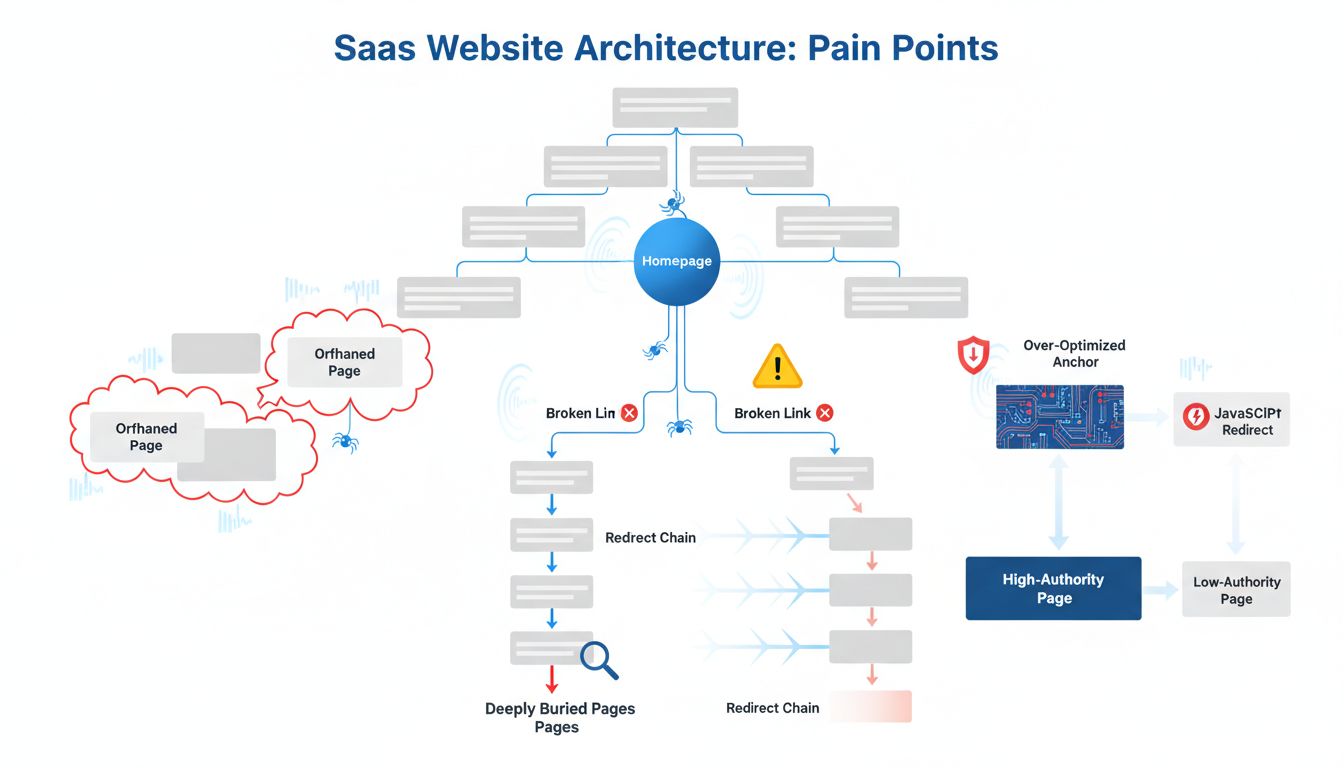
These are the mechanical failures I see most often in SaaS sites.
Orphaned New Pages
You publish a feature update or blog post without linking to it from anywhere. Crawlers may not discover it for weeks. Fix it immediately: link every new page from at least one relevant hub or high-traffic page within 24 hours.
Deep Page Burial
If your pricing or documentation page sits 5-6 clicks from the homepage, crawlers treat it as low priority. Use your hierarchy map from Step 1 to build a more direct path. Add contextual links from relevant product pages or category hubs to bring priority pages within 2-3 clicks.
Broken Links & Redirect Chains
A single broken link wastes a crawl request. A chain of three redirects (Page A → B → C → D) wastes three. Run a monthly audit with Screaming Frog, fix 404s immediately, and collapse redirect chains to a single hop wherever possible.
Over-Optimized Anchor Text
Using the exact target keyword as every anchor text ("SaaS pricing," "SaaS pricing," "SaaS pricing") looks manipulative. Use natural, varied language instead. "See plans," "get started," "pricing details" all work better.
Internal Redirects
JavaScript-driven navigation or meta-refresh redirects force crawlers to execute extra logic before following a link. Semrush notes these reduce crawl budget and slow page loads. Use <a href> links for all primary navigation and contextual linking.
Not Routing Equity
Your highest-authority pages hold the most link juice. If you're not actively linking from them to underperforming priority pages, you're leaving mechanical advantage sitting there unused.
Route that equity deliberately. It prompts recrawling and ranking improvements for the pages that actually need it most, and it's one of the clearest practical answers to why does internal linking help SEO.
Conclusion
Does internal linking help SEO? Yes. Measurably, mechanically, repeatably.
It's not some vague best practice. It's a system for controlling crawl budget and distributing authority across your site. Adding 12 strategic links can boost organic traffic by 34% and improve rankings by multiple positions [Source: screamingfrog.co.uk].
The four-step sprint, map your hierarchy, deploy tactical links, run a pilot test, scale to clusters, gets you real results without turning into a full-time project.
For SaaS specifically, the fastest wins come from linking high-authority marketing pages directly to deep conversion and documentation pages. Keep everything within 2-3 clicks of your homepage.
This isn't a one-off audit. It's part of your site's operating system now. To scale beyond manual checks, tools like Spectre can automate internal link analysis and keep your content continuously optimized for discovery and authority.