May 1st, 2026
Best SEO Tools for Small Business: Top Picks for Lean Content Teams
 WD
WDWarren Day
You're responsible for SEO at your small business, and you've already seen the lists: "50 Best SEO Tools." You try one, get lost in a sea of features, and your $300/month budget is gone before anything moves. The problem isn't that you picked the wrong tool. It's that you didn't have a strategy before you picked.
The best SEO stack for a small business isn't one expensive platform. It's 1-2 core paid tools aimed at your actual bottleneck, filled out with powerful free tools, chosen through a framework I call "validate, integrate, then invest."
Validate with free tools and trials first, so you're not paying for features you'll never touch. Integrate into the workflow you already have, WordPress, Google Docs, whatever your CMS is, so you're not doing manual data entry just to use the thing. Then invest, but only in what actually moves your specific needle, whether that's local visibility, content, or technical fixes.
This guide is about building a lean stack around your immediate business goals. You'll get a categorized seo tools list mapped to specific needs, guidance on what to actually do after you sign up, and sample stacks at different budgets. I'll also show you where AI fits into the best seo tools for digital marketing, where it genuinely saves time, and where you still need to stay in the loop.
You don't need every tool on every top seo tools list. You need the right ones for where your business is right now.
How We Chose: The 'Validate, Integrate, Invest' Framework for Lean Teams
Most SEO tool reviews are just "best of" lists. That's the wrong framing. When you're running a small business, you're not buying a tool, you're solving a bottleneck. The difference matters, because buying the wrong tool is just a slower way to waste money.
I've spent years building SEO systems at scale. One survey found 43% of marketers waste hours on tools that don't actually match their workflow. That number tracks with what I've seen firsthand.
So instead of another top SEO tools ranking, here's the framework I use: Validate, Integrate, Invest.
Validate before you buy. Every decent tool in this seo tools list has a free trial or tier, use it. Don't just poke around the dashboard. Run your actual workflow through it. Does it save you time on keyword research? Does the content editor fit how your team writes?
Integrate or it dies. The hidden cost of any tool isn't the monthly fee. It's the manual work of moving data between systems that don't talk to each other. If you're using WordPress, does it have a plugin? Does it connect to your project manager? The best seo tools for wordpress and other platforms are the ones that slot into what you're already doing. Tools that create extra steps get abandoned.
Invest only in what solves your biggest bottleneck. Struggling to produce enough content? A content optimizer like Surfer or Clearscope might be your primary investment. Is your Google Business Profile a mess? That's where BrightLocal earns its keep. For many small teams, the best seo tools for small business come from platforms like SE Ranking or Ubersuggest, they deliver 80% of what premium platforms like Ahrefs offer, at a fraction of the cost.
Your bottleneck dictates your primary tool category. The rest can often be handled by free tools.
1. SE Ranking: The Best Value All-in-One Suite
Best for teams who need comprehensive visibility without Semrush's price tag or cognitive load.

Is SE Ranking actually worth it when Ahrefs and Semrush exist? For most small businesses, yes, and defaulting to the big names is usually a mistake when you're still establishing your SEO processes.
SE Ranking gives you the core functionality you actually need as one of the best seo tools for small business: rank tracking, site audits, keyword research. One dashboard. No feature bloat. It's what I'd call the pragmatic starting point for anyone looking at seo tools for digital marketing without an enterprise budget.
I've used it with clients who get overwhelmed by bigger platforms. The interface is cleaner, the pricing scales transparently, and you get a solid baseline without drowning in tabs. For a team of 1-3 people, that consolidation saves hours each week.
The platform is used by hundreds of thousands of marketers. With median ROI from SEO campaigns sitting around 748%, this isn't a cost, it's a high-return investment, which puts SE Ranking firmly in the conversation for best paid seo tools at the SMB level.
Your first three tasks after signing up: set up rank tracking for your 10 most important keywords, run a full site audit and fix the "Critical" errors immediately, then use the Keyword Research tool to find five new long-tail ideas related to your core service.
Integration pro-tip: Use SE Ranking's white-label reporting to automate a monthly SEO health digest for stakeholders. Manual chore becomes a scheduled PDF in their inbox. Zero extra effort, and it justifies the tool's cost without you having to explain anything.
2. The AI Content Accelerators: Surfer SEO & Clearscope
Best for content teams who need to publish faster without sacrificing SEO quality.
If your bottleneck is content, these two tools are the ones worth knowing about.
Both use natural language processing to analyse top-ranking pages and give you a data-driven blueprint to compete. Teams using AI for SEO report saving 5–15 hours per week on drafting and optimisation. That's the actual promise here, and it's a reasonable one.
Surfer SEO is the all-in-one option. Real-time content editor, AI article generator, technical audit tools. Its best feature is the Google Docs and WordPress integration, your writer drafts with Surfer's panel open, getting live feedback on word count, heading structure, and keyword usage as they go.
You're optimising while you write, not doing a painful review afterward.
Clearscope is more like a precision QA tool. Less about generation, more about making sure your content covers the exact terms and questions showing up in both top-ranking pages and AI-generated responses (Gemini, GPT, etc.). It tells you if you've missed a semantic cluster your competitors already own.
The caveat worth taking seriously: these are guides, not gospel. Their outputs need a human editor to add real insight, expertise, and brand voice. Use them without oversight and you get generic, potentially inaccurate content. They show you the gap. You still have to fill it.
Integration pro-tip: Connect Surfer SEO to Google Docs via its extension. Have writers draft directly in Docs with the Content Editor panel open, turning optimisation from a post-draft chore into a real-time collaboration. This embeds SEO into the creative workflow, where it belongs.
3. BrightLocal: The Local SEO Essential
Best for any business with a physical location or serving a specific geographic area.
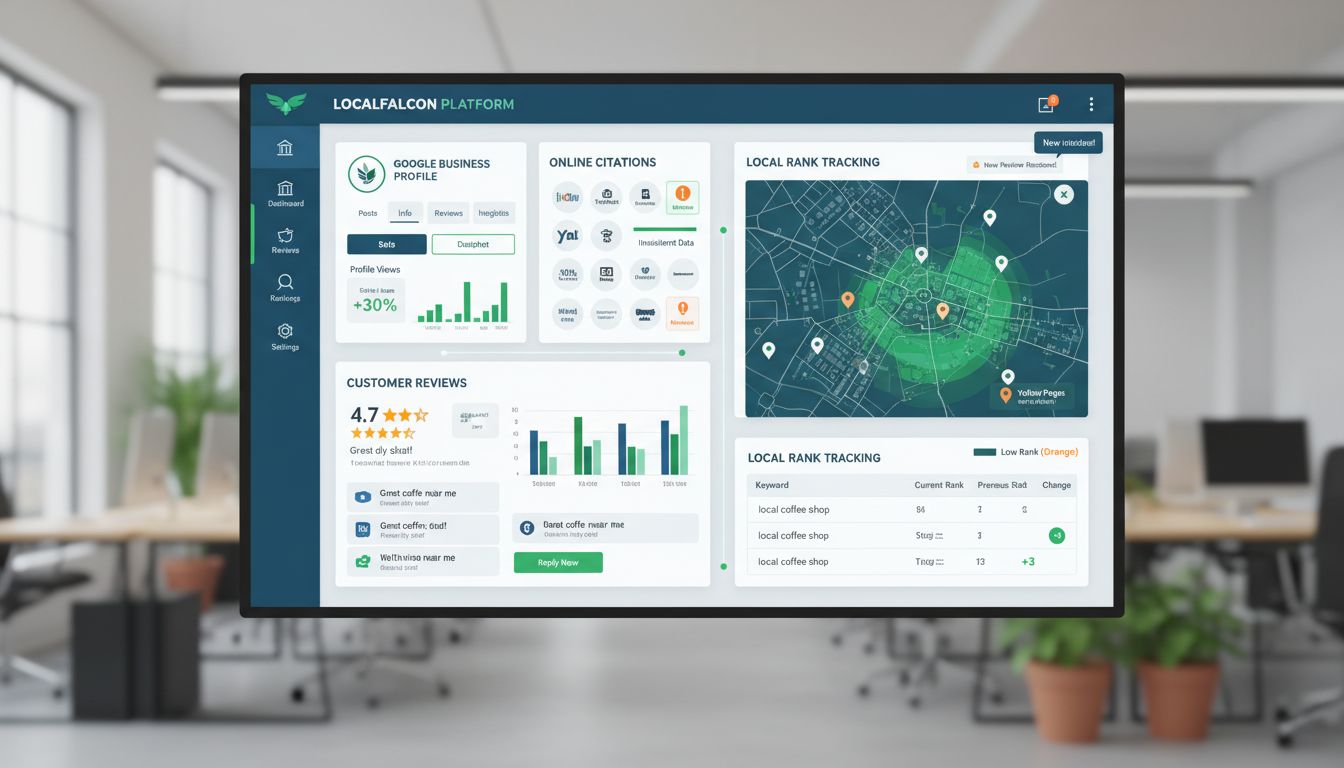
AI content tools get all the attention. But if your customers are searching "plumber near me" or "cafe in [town]", that's where the actual commercial intent is, and that's a different problem entirely.
BrightLocal handles the whole local workflow in one place: Google Business Profile management, citation building, review monitoring, local rank tracking. All from a single dashboard instead of a dozen separate logins.
For a local service business, that's not a minor convenience. It's just... less wasted time.
The platform starts at $39/month with a 14-day free trial. That's enough time to audit your current local presence and find the gaps before you commit to anything.
After signing up, do these things first: run the Local Site Audit to catch citation inconsistencies across directories, claim and verify your key business listings, then set up review monitoring so you're not finding out about negative feedback three weeks late. Local search matters, 80% of U.S. consumers search for local businesses weekly.
Integration pro-tip: Use BrightLocal's white-label reporting to put together a quarterly "Local Presence Health" report for stakeholders. Ranking improvements, review sentiment, citation accuracy, all in one place. It makes the ROI visible to whoever holds the budget and needs convincing. For a local electrician or accountant, pairing BrightLocal with Google Search Console and a free crawler can be a complete, effective SEO stack without spending much at all.
4. The Ahrefs & Semrush Dilemma: When They're Worth the Splurge
Best for teams that have validated SEO as a primary channel and need deep competitive intelligence to displace established players.
Do you actually need a billion-page index? That's the real question before you spend a dollar on either of these.
Ahrefs and Semrush are the best paid seo tools on the market. They're also massive data platforms that can feel like drinking from a firehose. They're not your first purchase.
They become worth it when your growth depends on outmanoeuvring competitors with established domain authority. Not before.
Ahrefs is built around its backlink index and the depth of Keywords Explorer. If your strategy hinges on understanding who links to your competitors and why, it's genuinely hard to beat. Semrush sits wider, stronger for content gap analysis, advertising research, and it covers more of the broader marketing intelligence side of things. More horizontal, less deep.
The weakness is the strength: overwhelming depth. For a 10-page local business website, you don't need that scale.
The learning curve is real, and at $108+/month for Ahrefs Lite, the cost has to be justified by actual ROI. Worth noting: nearly 41% of Ahrefs users are in 0–9 employee organisations. So plenty of small teams do treat it as a core business intelligence cost.
Here's my rule: Invest only after you've proven SEO drives customers and you've hit a data ceiling with cheaper tools.
Are you trying to reverse-engineer a competitor's entire content and link-building strategy? That's a valid use case. Use their 7-day trials for one focused project, mapping a rival's backlink profile, for example, not a general poke around.
If that project gives you something actionable, the subscription pays for itself. If not, you've saved thousands.
5. Non-Negotiable Free Tools: Google Search Console & Screaming Frog
Best for every business with a website, regardless of budget or SEO maturity.
These aren't "nice-to-haves" you'll upgrade from later. Google Search Console and Screaming Frog are the mandatory, zero-cost foundation of your entire SEO effort. One tells you what Google sees. The other shows you what your site actually looks like.
Google Search Console is your SEO vital signs monitor. It's the only place you get direct performance data from Google itself. The 'Performance' report shows which queries drive clicks. The 'Index Coverage' report reveals errors blocking pages from ranking. The 'Experience' section covers your Core Web Vitals.
Fixing these errors isn't busywork either. Sites that do this systematically see a median traffic uplift of around 12% within three months.
Screaming Frog SEO Spider is your technical audit tool. The free tier crawls up to 500 URLs, which covers most small business sites. It surfaces broken links, duplicate content, missing meta tags, and messy site architecture.
Export the 'Internal Links' report and you'll see your site's structure laid out in front of you. Often you'll find pages buried too deep or completely orphaned from your main content flow.
Your first three tasks (do this quarterly): 1) Crawl your entire site with Screaming Frog. 2) Export the 'Internal Links' and '404s' reports. 3) In GSC, review the 'Index Coverage' report and fix critical errors.
This isn't a checklist. It's a system. Use Screaming Frog to find issues, fix them, then watch the traffic impact in GSC.
If you're skipping this and paying for premium tools instead, you're analyzing a broken foundation. That's the wrong order.
Building Your Lean SEO Stack: A Practical Framework (With Examples)
Stop looking for the single "best" tool.
The right SEO stack for a small business is a combination that solves your specific bottleneck, fits your budget, and works inside your existing workflow. Here are four practical scenarios, cheapest to most sophisticated.
Scenario 1: The Bootstrapped Blogger (Budget £50/mo)
Goal: Publish your first 10-15 optimized articles. Stack: Google Search Console (free) + Screaming Frog (free tier) + AnswerThePublic (£11/mo).
This is one of the best seo tools for beginners because it costs almost nothing and forces good habits early. You use AnswerThePublic to find question-based topics people actually search for, write in your CMS, run Screaming Frog quarterly for broken links, and watch GSC for indexing errors.
Pure validation. Prove content drives traffic before you spend more.
Scenario 2: The Local Service Business (Budget £100/mo)
Goal: Dominate "plumber near me" searches. Stack: Google Search Console (free) + BrightLocal (£39/mo) + Screaming Frog (free).
BrightLocal handles your Google Business Profile, local citations, and reviews. The free tools handle site health.
This is where 80% of your customers will actually find you. A typical small business now uses around five AI tools, but for local SEO, consolidation wins.
Scenario 3: The Scaling Content Team (Budget £200/mo)
Goal: Systemize content production to publish weekly. Stack: SE Ranking (Core plan, ~£76/mo) + Surfer SEO (Essential, £69/mo) + GSC (free).
SE Ranking gives you the all-in-one dashboard: keyword research, ranking tracking, site audits. Surfer SEO then acts as your editor, making sure every piece hits the right notes before it goes live.
Strategy in SE Ranking. Execution in Surfer. Clean separation.
Scenario 4: The Strategic Competitor (Budget: Flexible)
Goal: Deep competitive intelligence in a crowded market. Stack: Ahrefs (Lite, $108/mo) OR Semrush (Pro tier) + a specialized tool like Clearscope + GSC.
You've already validated SEO as a channel. Now you need the backlink data and keyword gap analysis that only Ahrefs or Semrush can give you. These are the best paid seo tools for a reason, there's no free equivalent that comes close.
Layer on Clearscope for editorial QA. This is for businesses ready to invest in rankings that hold.
The rule is simple: start with Scenario 1 or 2. Only add a new tool when you can clearly name the specific bottleneck it solves.
Never stack two all-in-one platforms. You'll just pay twice for the same features.
Common Pitfalls to Avoid When Choosing SEO Tools

The right tools accelerate growth. The wrong ones waste budget and create busywork. Here are the most common, and costly, mistakes I see small teams make.
1. Buying the 'Best' Tool for Your Stage Choosing Ahrefs because it's "the best" when you only need basic rank tracking wastes £100+ a month and overwhelms you with features you won't use. Start with the tool that solves your current bottleneck, not the one that promises everything.
2. Skipping the Free Trial Validation 43% of marketers waste hours using tools that don't match their workflow because they never properly tested them. [Source: Yadav Bikash] A trial isn't just to see if the dashboard looks nice. It's to check whether the tool actually fits into your content calendar and reporting process.
3. Letting AI Run Without a Human-in-the-Loop Publishing unedited AI content is a fast track to factual errors, accidental plagiarism, and generic articles that don't rank.
AI is an assistant, not a replacement. Always edit, fact-check, and inject your own expertise. Independent guidance warns that AI content can hallucinate or be biased, so human oversight is non-negotiable. [Source: Conductor Academy]
4. Ignoring the Free Fundamentals While Paying for Fancy Features Paying £200/month for an AI writer while ignoring critical errors in free Google Search Console is a fundamental misallocation.
Sites that systematically fix GSC errors report a median traffic uplift of about 12% within three months. The free tools are often where the highest-impact, lowest-cost wins live.
5. Underinvesting in Local Tooling for a Local Business If you serve a geographic area, relying only on a general SEO suite like Semrush leaves massive, high-intent local traffic on the table.
You need dedicated tooling to manage listings, respond to reviews, and track local pack rankings. This isn't a nice-to-have. It's the core of your visibility.
Conclusion
The best SEO tools for small business aren't sitting on one platform waiting for you. You build the stack yourself, piece by piece: validate with free trials, pick tools that fit your actual workflow, then pay only for what solves the problem you have right now.
That usually means 1-2 core paid tools from this seo tools list, something like SE Ranking for overall visibility, Surfer SEO if content is your bottleneck, or BrightLocal if you're chasing local rankings, combined with the free fundamentals like Google Search Console and Screaming Frog. Those free tools are non-negotiable regardless of budget.
Worth knowing: 67% of small businesses already use AI for SEO tasks [Source: semrush.com]. But the best seo tools for small businesses, whether that's the top seo tools free options or the best paid seo tools, all still need a human checking the output. AI hallucinates. Unedited content shows.
This week, pick your single biggest bottleneck. Find one tool from this seo tools for digital marketing guide that addresses it, whether you're after wordpress seo tools, best seo tools for website audits, or seo software tools free options to start with. Use the trial fully. See if it fits before you spend anything.
The best seo tools for beginners aren't the most feature-rich ones. They're the ones you'll actually use. Same goes for the best seo tools for wordpress users, or anyone running a lean operation without a dedicated SEO team.
Figure out what's slowing you down. Start there.
Frequently Asked Questions
What is the most affordable all-in-one SEO tool for a beginner?
For most small businesses just starting out, SE Ranking is the move. Or grab a free trial of Semrush. Both give you rank tracking, site audits, and keyword research in one place, one dashboard to learn, no juggling multiple subscriptions.
Just use the trial first. Make sure it actually fits how your team works before you pay anything.
Do I really need an expensive tool like Ahrefs or Semrush?
No. They're powerful, but the real cost isn't just the monthly fee, it's the time to actually learn the thing. For a team of one or two people, they can be a lot.
Start with something simpler. Only consider Ahrefs or Semrush once you've already proven SEO is working with a basic tool, and you have a specific need, like deep backlink analysis or competitive research, that genuinely justifies the learning curve.
What's the best free SEO tool I'm probably missing?
Google Search Console. It's free, it pulls data straight from Google, and it tells you what's actually happening with your site, search queries, indexing issues, health problems. Skipping it means you're guessing.
The 500-URL free tier of Screaming Frog is also worth knowing about. It handles detailed technical audits on small business websites better than most people expect from a free tool. These two are the zero-cost foundation. Non-negotiable, regardless of what else you use.
Which tool is best for my local business with a physical location?
General seo tools for small business often miss the local stuff entirely. BrightLocal (starts at $39/month) pulls listings management, review monitoring, and local rank tracking into one dashboard.
That matters because 80% of U.S. consumers search for local businesses weekly [Source: soci.ai]. Trying to manage your Google Business Profile and other listings by hand is slow and error-prone. BrightLocal just handles it.
How can AI SEO tools actually save me time without hurting quality?
AI tools speed up the research and drafting phases a lot. Something like Surfer SEO, or the AI features inside Semrush, can build content outlines, flag relevant terms, and give you optimization feedback as you write. Teams using these features report saving 5–15 hours per week [Source: slatehq.com].
But you still have to edit everything. Fact-check it. Add something a generic AI wouldn't know to say. The output is a starting point, not a finished product.
How many SEO tools do I actually need to buy?
Not many. The right ones.
Start with Google Search Console and Screaming Frog's free tier. Then pick ONE paid tool based on wherever you're most stuck, an all-in-one suite, a content optimizer, a local specialist. Don't add a second paid tool until you've actually built the first one into your weekly routine and can name a specific reason you need more.
Two or three tools total is plenty for most lean teams. More than that and you're paying for things you won't use.