March 18th, 2026
How to Amplify AI-Generated SEO Content with Free Social Media Management Tools
 WD
WDWarren Day
You've spent hours using AI to pump out SEO blog posts, and your analytics look like a graveyard. The problem isn't that you can't create content fast enough. It's that nobody's seeing it.
Here's what most SaaS founders and solo marketers get wrong: ChatGPT and Jasper solved the production problem. You can bang out a month's worth of posts in an afternoon now. But then what? You publish, cross your fingers, and hope Google notices. Hope someone shares it. Hope traffic shows up eventually.
It doesn't work that way.
The real opportunity isn't writing more posts. It's building a system that distributes your content automatically, while you're doing literally anything else. And no, you don't need to hire a social media manager or drop cash on enterprise tools. The right mix of free social media management tools can turn your dusty content library into actual traffic and engagement.
Something worth paying attention to: LinkedIn now shows up in 11% of all AI-generated answers across ChatGPT, Perplexity, and Google's AI Mode. Social platforms aren't just places to get likes anymore. They're feeding directly into generative search results. Xponent21 figured this out, built a systematic distribution process for their AI content, and saw 4,162% organic traffic growth with over 10.5 million search impressions.
The difference between teams getting results and those watching tumbleweeds roll through their site? Workflow. Not talent, not budget.
This guide gives you a complete, zero-cost distribution system: five free tools, one integrated workflow, and a way to measure how your social activity actually impacts SEO. By the end, you'll know how to turn every blog post into a multi-platform asset that reaches both real humans and AI search engines.
The New Reality: Social Signals, GEO, and the Indirect Path to SEO Growth
Social shares don't directly boost your Google rankings. Google's been clear about this for years. Likes, retweets, shares? Not ranking signals.
But here's what actually happens.

Every share creates a potential backlink opportunity. Every mention increases brand search volume. Every piece of engagement accelerates how quickly search engines discover and crawl your new content. Social platforms function as discovery engines, not just for humans, but for the algorithms that decide what gets indexed, cited, and ranked.
The game changed in 2026. You're no longer just optimizing for Google's traditional blue links.
Welcome to Generative Engine Optimization (GEO). When someone asks ChatGPT, Perplexy, or Google AI Mode a question, these models pull from public web sources to construct their answers. Your visibility on these platforms directly influences whether your brand appears in those AI-generated responses.
Look at the data. LinkedIn now ranks as the #2 domain cited by AI models, appearing in 11% of AI responses across ChatGPT Search, Perplexity, and Google AI Mode. Even more revealing: long-form articles (500–2,000 words) and mid-length posts (50–299 words) account for the largest share of these AI citations.
This is your leverage.
You've already created the long-form AI blog content. The opportunity isn't to create more. It's to atomize what you have into the formats and platforms that AI models actively scan and cite.
Think of it through the lens of SEO's four pillars: Technical, Content, On-Page, and Off-Page. Traditional SEO wisdom focuses on the first three. But Off-Page SEO, the signals that happen away from your domain, is where social amplification lives. Brand mentions, link acquisition, and topical authority all compound when your content reaches the platforms where conversations, citations, and discovery actually happen.
Is SEO still worth it with AI? Absolutely. But only when paired with strategic distribution. Your AI-generated content library is an asset. free social media management tools transform it from a static archive into a living, working system that feeds both human audiences and the AI models reshaping search.
Building Your Minimum Viable Amplification Stack: 5 Free Tools
You don't need a $500/month SaaS budget to build a functioning social amplification engine. You need five free tools, each with a specific job, working together as a system.
Here's your minimum viable stack:
| Tool Category | Tool Name (Free Plan) | Key Free Features & Limits | Best For |
|---|---|---|---|
| Scheduler | Buffer | 3 channels, 10 scheduled posts per channel. Lifetime limit of 8 total channel connections. | Core scheduling hub for LinkedIn, Twitter/X, Facebook. |
| Scheduler | Meta Business Suite | Manage & schedule posts to Facebook Pages and Instagram. No post limit stated. | Dedicated Facebook/Instagram scheduling. |
| Automator | Zapier | 5 single-step Zaps, 100 tasks/month, 15-min polling. | Automating RSS-to-social-post workflows. |
| Content Repurposer | Canva / Adobe Express | Thousands of free templates (LinkedIn carousels, TikTok videos). Adobe has a native content scheduler. | Creating platform-optimized visuals and short videos. |
| Link & Tracker | Bitly + UTM.io Chrome Extension | Bitly: Short links, 301 redirects, basic dashboard. UTM.io: Enforce consistent UTM tagging rules. | Creating trackable links and measuring traffic sources. |
Is Hootsuite really free? Not in any meaningful way. Hootsuite offers a 30-day trial, then requires payment. Buffer's free tier is permanent, making it the better choice for bootstrapped teams.
Why This Stack Works
Buffer is your scheduling brain. Three channels sounds limiting until you realize LinkedIn, Twitter/X, and Facebook cover the majority of B2B social reach. The 10-post-per-channel limit forces discipline. You're scheduling strategically, not spamming. The lifetime cap of eight total connections means you can test different platforms over time without losing access.
Meta Business Suite handles the Facebook-Instagram universe. Since Buffer's free plan caps at three channels, Meta's native scheduler picks up the slack for your Facebook Page and Instagram Business account. No fancy analytics, but unlimited scheduling beats paying for a fourth Buffer slot.
Zapier is your automation layer.
Five single-step Zaps and 100 tasks per month is enough to auto-post new blog content to two or three social channels via RSS. The 15-minute polling delay is irrelevant for evergreen SEO content. You're not breaking news. One Zap can trigger when your blog RSS updates and post a formatted snippet to LinkedIn. That's 25 blog posts auto-distributed per month if you publish daily.
Canva and Adobe Express turn text into engagement bait. LinkedIn carousel templates, TikTok video frames, quote cards. These visual formats consistently outperform plain text. Adobe Express even includes a content scheduler for TikTok, LinkedIn, and Pinterest, giving you a fourth scheduling option if you exhaust Buffer's limits.
Bitly and UTM.io make your traffic measurable. Bitly's free tier provides permanent 301 redirects and a click dashboard. UTM.io's Chrome extension enforces naming conventions so you're not guessing which social post drove traffic. Without trackable links, you're flying blind.
Honorable mentions: TweetDeck for managing multiple Twitter/X accounts and columns in real time. IFTTT as a Zapier alternative (though its free tier is more restrictive). RSS.app if you need to generate custom RSS feeds from platforms that don't offer them natively.
This isn't about hoarding tools. It's about assigning each one a clear role in a workflow that turns your AI-generated content library into a predictable distribution machine.
Next, we'll wire them together.
The 5-Step Free Tool Amplification Workflow
Here's the exact process that connects your AI-generated blog post to automated social distribution. No theory, no fluff, just the recipe.
Step 1: Optimize & Publish Your AI-Generated Blog Post
Before anything else, your blog post needs to be publish-ready. Run through your E-E-A-T checklist: author byline, citations, original insights that AI couldn't generate alone. Confirm your target keyword appears in the H1, first paragraph, and at least one H2.
Publish it with a clean, permanent URL. This post is now the fuel for everything that follows.
Step 2: Repurpose Core Insights into Platform-Specific Formats
Most people share the same generic "Check out my new blog post!" message across every channel and wonder why no one clicks.
Don't do that. Extract the most valuable pieces of your article and adapt them:
- Twitter/X: Pull one contrarian or surprising quote from the post (aim for 200–240 characters). Add the link. Done.
- LinkedIn text post: Write 3–5 bullet points summarizing your key takeaways. Frame it as "Here's what I learned" or "Three things most people get wrong about [topic]." Include the link in the first comment.
- LinkedIn carousel: Use Canva's free LinkedIn carousel templates to turn 5–7 main points into slides. Remember, carousels get 3.7× more engagement than text posts.
- YouTube Shorts or TikTok: Draft a 30-second script. One hook, one core insight, one CTA ("Link in bio" or "Full breakdown on my blog").
You'll hear people reference the "5-3-2 rule" (five curated pieces, three original, two personal) or the "5-5-5 rule" (five posts, five engagements, five shares). Those are fine starting points, but they're arbitrary ratios. Your repurposing strategy should be driven by what formats your audience actually engages with, not a catchy mnemonic.
Step 3: Generate an RSS Feed for Your Blog
Most modern blog platforms (WordPress, Ghost, Webflow) generate RSS feeds automatically, usually at yourdomain.com/feed or /rss.
If yours doesn't, use RSS.app's free plan to create one. Sign up at RSS.app, click "Create Feed," and input your blog's URL. The free plan gives you two feeds that refresh every 24 hours and display up to five posts at a time. That's plenty for a small team publishing 2–4 articles per month.
Copy the RSS feed URL. You'll need it in the next step.
Step 4: Automate Distribution with Zapier (The Secret Sauce)
This is where the workflow becomes a machine.
You're going to create a Zap that watches your RSS feed and auto-generates a social media draft every time you publish. Log into Zapier (free plan = five single-step Zaps, 100 tasks per month). Click "Create Zap." Here's your exact recipe:
Trigger:
- App: RSS by Zapier
- Event: New Item in Feed
- Feed URL: Paste your RSS feed from Step 3
- Test it to confirm Zapier can read your latest post
Action:
- App: Buffer (or Meta Business Suite if you're only using Facebook/Instagram)
- Event: Create Draft (not "Add to Queue", you want control over timing)
- Map the fields:
- Text: Use the RSS item title + a short teaser (you can write a template like "New post: {{Title}}. Here's why it matters:")
- Link: RSS item URL
- Profile: Select which Buffer channel (LinkedIn, Twitter, etc.)
Save and turn on the Zap. From now on, every new blog post automatically creates a draft in Buffer within 15 minutes (Zapier's free-plan polling interval).
Pro tip: Create separate Zaps for different channels if you want platform-specific text. One Zap for LinkedIn drafts, another for Twitter.
Step 5: Schedule, Track, and Engage
Once a week, log into Buffer or Meta Business Suite. You'll see auto-generated drafts waiting for you.
This is where you add the polish:
- Attach the carousel PDF or video you created in Step 2
- Refine the caption to match platform tone
- Use the UTM.io Chrome extension to build a trackable link:
utm_source=linkedin,utm_medium=social,utm_campaign=blog_amplify_[month]. Or use Bitly to shorten and track clicks. - Schedule the post using a consistent pattern, promote each article 3× over two weeks across different channels, varying the format each time
Automation handles distribution. You handle engagement.
Block 15 minutes daily to respond to comments and DMs on your scheduled posts. Social algorithms reward quick replies, and this is where trust (the first E in E-E-A-T) actually gets built.
Visual aid: If you're a visual thinker, open Canva and sketch a simple flowchart: Blog Post → RSS Feed → Zapier Trigger → Buffer Draft → Scheduled Post. Pin it above your desk. This is your amplification engine.
Maximizing Engagement: 2026's High-Impact Formats

Your workflow is humming. Posts are scheduling automatically. But if you're just pushing plain text links, you're leaving 70% of the potential engagement on the table.
Platform algorithms reward native formats. The content types designed to keep users scrolling within the platform.
Here's how to repurpose your AI-generated blog posts into the three formats dominating 2026.
LinkedIn Carousels: Turn Blog Posts Into Thumb-Stopping Assets
LinkedIn carousels achieve 3.7× more engagement than text posts, and document uploads (PDFs) hit an 82% engagement rate. That's not a typo.
Open your blog post and identify 5–7 key points. Problems, solutions, data points. Head to Canva's free LinkedIn carousel templates or Adobe Express's carousel builder. Each slide should follow a simple structure: bold headline at the top, 2–3 sentences of body text, and a visual element like an icon, chart, or contrasting color block.
Slide 1 is your hook: "5 Reasons Your SEO Content Isn't Driving Traffic." Slides 2–6 unpack each reason with one actionable fix per slide. Slide 7 is your CTA: "Full breakdown in the comments" with a link to your blog post.
For deeper topics, export your blog post as a clean PDF. Remove navigation, add page numbers, include your logo. Upload it directly to LinkedIn as a document post. The algorithm treats it like native content, and readers can flip through without leaving the platform.
YouTube Shorts: Capture 70 Billion Daily Views
YouTube Shorts generate over 70 billion daily views, and YouTube remains one of the most-cited domains in AI-generated answers. That's a double win for discovery and GEO visibility.
Pick your blog post's single strongest tip. The one that makes someone think, "Wait, I didn't know that." Record a 45–60 second vertical video (your phone is fine). Use on-screen text to reinforce your point since many viewers watch on mute.
The secret? Trending audio. Browse YouTube Shorts in your niche, note which audio tracks appear repeatedly, and layer one onto your video. The algorithm favors Shorts that use popular sounds because they keep viewers engaged longer.
Don't overthink production. A static shot of you talking to camera works. So does a screen recording with voiceover. Consistency beats polish.
X (Twitter) Threads: Atomize Long-Form Into Bite-Sized Authority
Take your 1,500-word blog post and break it into a 7–10 tweet thread. Each tweet should stand alone but build toward the full argument.
Tweet 1 is the hook. Tweets 2–9 are your subheadings turned into standalone insights. Tweet 10 links to the full post.
This "atomization" strategy works because threads get retweeted, quoted, and screenshot more than single tweets. A Reddit AI SEO community used this exact approach and generated 50,400+ organic views in 60 days without spending a dollar. They shared valuable, broken-down resources instead of link dumps.
One warning: don't dump the same content verbatim across all platforms. A LinkedIn carousel isn't a Twitter thread with images. A YouTube Short isn't a carousel with a voiceover. Tailor the tone, pacing, and format to each platform's culture, or you'll train your audience to ignore you.
Measuring the SEO Impact: Moving Beyond Vanity Metrics
Your posts are live. Engagement is trickling in. But your CEO doesn't care about retweets, they want to know if this social effort is moving the needle on organic search.
Here's the problem: most teams stop at vanity metrics. Likes, shares, follower counts. These feel good but tell you nothing about whether your social amplification is actually feeding your SEO engine. You need to connect social activity to search behavior, backlink acquisition, and branded traffic.
Let's set up the measurement infrastructure that proves ROI.
Setup 1: GA4 Custom Channel Groups for Social Traffic
GA4's default channel grouping often miscategorizes social traffic or lumps it into "Referral." You need granular visibility.
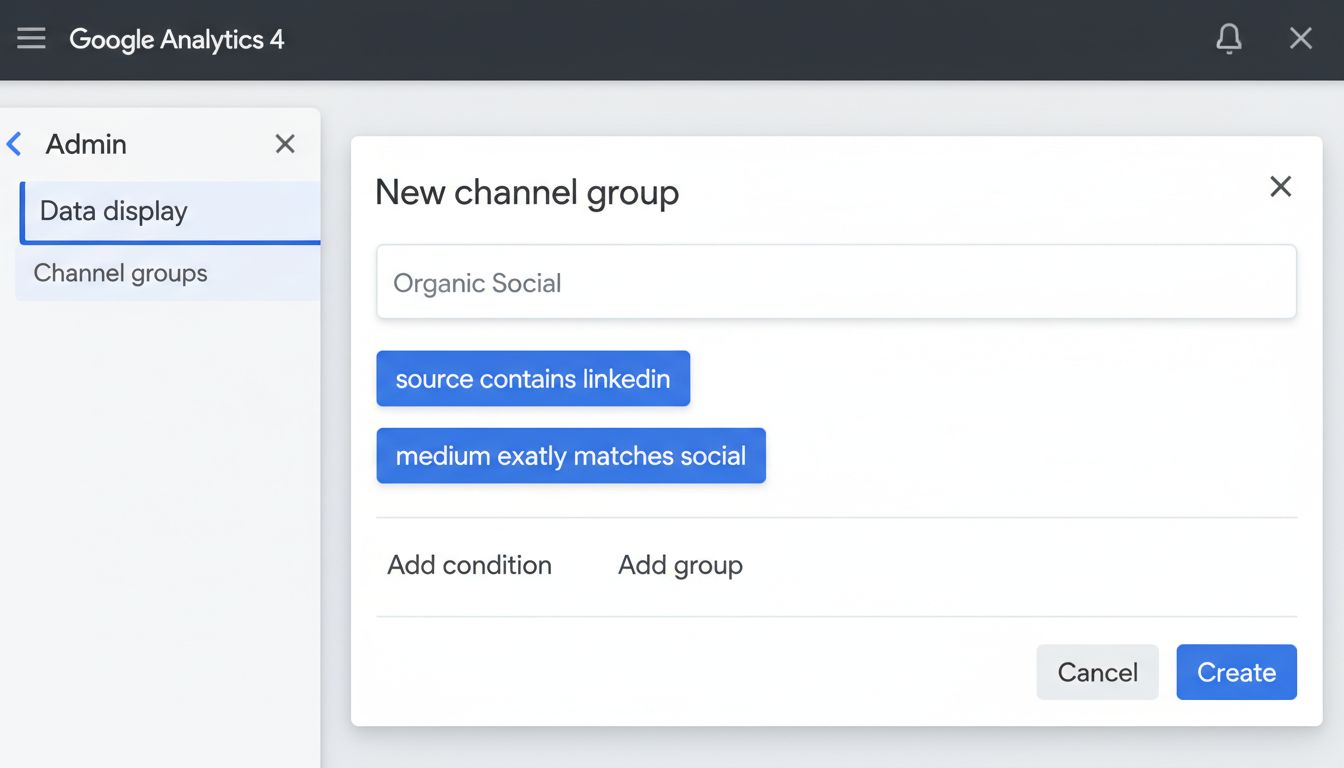
Navigate to Admin > Data display > Channel groups and create a new custom channel group called "Organic Social." Add rules for LinkedIn, X (Twitter), Facebook, Instagram, YouTube, and TikTok using source/medium conditions (e.g., source contains linkedin OR medium exactly matches social).
Now go to Reports > Acquisition > Traffic acquisition and filter by your new "Organic Social" group. You'll see sessions, engagement rate, conversions, and revenue attributed to each platform. Compare this month-over-month as you scale your amplification workflow.
Don't forget the "Referral" channel. Filter it to catch Reddit, Hacker News, niche forums, and any platforms GA4 didn't auto-classify. These often drive high-intent traffic that converts better than mainstream social.
Setup 2: Google Search Console's Social Channel Integration
Google launched social channel tracking in Search Console in December 2025, and most marketers still don't know it exists.
This feature shows which search queries led to clicks after someone encountered your content on social. Go to Performance > Search results, then click the filter icon and select Social under the "Channel" dropdown. You'll see impressions, clicks, CTR, and average position for queries tied to social shares. The audience location data tells you which countries are clicking through from social. Use this to prioritize content topics and formats.
This is the smoking gun: direct evidence that your LinkedIn carousel or Reddit comment drove someone back to Google to search for your brand or topic.
KPIs to Watch (The Real ROI)
Track these metrics monthly:
Branded search volume (in GSC and GA4). If your social presence is working, more people will Google your company name or product. Filter GSC queries by brand terms and watch the trend line.
Referral traffic from social platforms (GA4). Set a baseline, then measure lift as you publish more consistently.
Impressions and clicks from the "Social" channel (GSC). This is your proof that social amplification influences search behavior.
Backlinks acquired from social discovery. Use Ahrefs, Moz, or even manual tracking. When someone sees your LinkedIn post, clicks through, and links to your article in their own blog, that's a compound SEO win.
What NOT to Obsess Over
Likes and follower count are health metrics, not success metrics.
A post with 50 likes that drives 200 blog visits and three backlinks beats a post with 500 likes and zero referral traffic every single time. Engagement signals platform relevance. Traffic and backlinks signal business impact.
If your social metrics are climbing but none of these KPIs are moving, your content isn't converting attention into search equity. Revisit your CTAs, link placement, and content-platform fit.
Common Pitfalls & Your Compliance Checklist
Your stack is running. Content is flowing. Everything looks good on paper.
This is exactly where most teams blow it. Not because their strategy is wrong, but because they walk straight into avoidable traps that kill all the momentum they've built. Some are tactical mistakes. Others are legal landmines nobody talks about until it's too late.
Pitfall 1: Audience Fatigue from Lazy Repurposing. Copy-pasting the same blog excerpt to Twitter, LinkedIn, and Facebook with zero adaptation trains your audience to scroll past you. Each platform has its own culture. LinkedIn wants professional insight and data. Twitter wants hot takes and threads. Facebook wants... well, Facebook is complicated, but it definitely doesn't want your LinkedIn post verbatim. Adapt tone, format, and hook for each channel or watch your engagement flatline.
Pitfall 2: The 'Set-and-Forget' Automation Trap. Automation distributes content. It doesn't build relationships.
Schedule 20 posts and never reply to a single comment? You're broadcasting into a void. Block 15 minutes, three times per week, to engage with replies on your scheduled posts. That's where the backlinks start. That's where partnerships form. That's where someone thinks "I should Google this company."
Pitfall 3: Ignoring Platform-Native Features. Linking to a PDF on your site gets clicks. Uploading that same PDF natively to LinkedIn as a carousel gets 3.7× more engagement. Platforms reward content that keeps users on-platform. Use LinkedIn's document uploader, Twitter's native video, TikTok's in-app editor instead of defaulting to external links every time.
Pitfall 4: Flooding a Channel. Posting five blog links in 30 minutes might feel productive, but it tanks your click-through rate. Twitter's algorithm punishes rapid-fire link posting. Space out your promotions. One high-value post per day per platform beats a daily link dump every single time.
Pitfall 5: The Legal Blind Spot – AI Content Labeling. Most founders using AI to generate content have no idea they're about to be legally required to disclose it.
Look, I'm not a lawyer. But ignoring this won't make it go away.
Compliance Checklist
1. Label AI-Generated Content. As of August 2, 2026, the EU AI Act and California AI Transparency Act require clear labeling of AI-generated content. Add a discrete disclaimer ("AI-assisted" or "Created with AI tools") to social posts derived from AI-written blogs. This isn't a suggestion. It's regulatory compliance. The fines are real.
2. Follow FTC Guidelines. Disclose affiliate links and partnerships. The FTC has also issued guidance on AI and consumer protection, so don't make deceptive claims about what your AI content can deliver.
3. Maintain E-E-A-T. Can I use AI-generated content for SEO? Yes, but only if you layer in your expert commentary, original case studies, and proprietary data. Google's algorithms reward experience and expertise. AI drafts the skeleton. You add the authority. Without that, you're just another generic AI slop site.
4. Protect Your IP. What not to say to an AI? Never input confidential client data, unreleased product specs, or sensitive business metrics into public AI tools. You're feeding a training model, not a locked vault. I've seen startups leak competitive advantages because someone pasted internal strategy docs into ChatGPT to "clean up the wording."
Conclusion
You don't need a marketing team or a five-figure software budget to make this work. You need a system that you'll actually stick with.
The stack is straightforward. Buffer or TweetDeck for scheduling, Zapier for automation, Canva for carousals, GA4 and Search Console for measurement. That's it. The workflow is even simpler: take one blog post, adapt it into platform-specific formats, schedule them across channels, track which posts drive clicks, refine what's working.
This isn't about chasing viral moments. It's about compounding. Every article you publish fuels weeks of social engagement, backlinks, brand searches, and visibility in AI-generated answers. One post becomes 15 touchpoints.
The best social media management tools aren't the ones with the longest feature lists. They're the ones you'll open every week without thinking about it. Buffer's free tier beats Hootsuite's limitations for exactly this workflow. Your multi-platform strategy matters more than any single tool.
Your action this week: Pick one tool and use it. Create a carousel from your latest post in Canva. Or set up your first RSS-to-social Zap. The 4,162% growth stories? They all started by systematizing one piece, then stacking the next.