May 7th, 2026
How to Build an Internal Linking Strategy That Boosts SEO and AI Crawlers
 WD
WDWarren Day
You've published good content, but traffic has flatlined. You've added a few internal links here and there. Your most important commercial pages still aren't ranking, and the blog feels like a disconnected archive.
The problem isn't a lack of links. It's a lack of strategy.
Most internal linking advice treats it as basic hygiene. Add links where relevant. Use descriptive anchor text. That's surface-level thinking, and it yields surface-level results. What actually moves the needle is treating your site's link architecture as a system for directing crawl budget and distributing authority.
A blog increased organic traffic by 43% after improving its internal linking. IFTTT hit 33% year-on-year organic traffic growth after implementing a systematic approach. These aren't flukes.
They're what happens when you stop managing a website and start engineering one.
This guide gives you a technical, actionable blueprint for building a self-reinforcing SEO system around your internal linking strategy. You'll learn to audit your current structure like a technical SEO, design a crawl-efficient architecture, execute a measurable linking plan, and scale maintenance with automation. I'll skip the theory and get into the actual workflows I've used across startups and media companies to turn content archives into ranking assets.
Before You Start: Audit Tools and Data You'll Need
What do you actually need before running an internal linking audit? Three things: the right tools, the right data, and a clear list of the pages that matter.
Think of this like an engineering project, not a marketing task. You're the project manager. Wrong setup means wasted effort and shallow results.
Your Core Toolstack: Crawlers, Keyword Data, and Access
First, a crawler. Screaming Frog SEO Spider is the go-to for mapping your site's link graph, finding orphaned pages, and analyzing crawl depth. It shows you your site the way Googlebot sees it.
Second, a keyword rank tracker like Ahrefs or Semrush. Not for vanity metrics. You'll use it to find pages already ranking for relevant terms, those become your best source pages for new internal links.
Third, direct access: your CMS to edit pages, and your XML sitemap to compare your intended structure against reality.
Gathering Your Priority Page List
Before you run a single audit, define your objectives. Open a spreadsheet, two columns.
First column: your commercial "money" pages. Product pages, key service pages, pricing pages, anything that directly drives sign-ups, demos, or purchases.
Second column: your cornerstone content. The ultimate guides and pillar articles that establish topical authority.
Aim for 10-20 URLs total. This list is your north star for every decision you make about your internal linking strategy. If a linking decision doesn't serve one of these pages, it's probably not worth your time.
Step 1: Run the Technical Audit (Find What's Broken and Buried)
Your first job is finding and eliminating "crawl waste", any link that makes a bot spend time on something useless. Think of Googlebot's crawl budget as finite server capacity. You want every byte spent discovering and ranking your commercial pages, not chasing dead ends.
Open Screaming Frog, enter your domain, run a full crawl. Don't just glance at the dashboard. You're looking for broken links and redirect chains, orphan pages, and content that's buried too deep.
Find and Fix Redirect Chains and Broken Links
In Screaming Frog, go to Response Codes > Client Errors (4xx). Export that list, those are your broken internal links. Fix them by either restoring the target page or updating the link to a valid URL.
Then go to the Internal tab. Add a filter for Destination Status Code containing 301 or 302. This shows every internal link pointing to a redirected URL. Each one is an unnecessary hop for the crawler. In a reported enterprise case, removing links to redirected URLs instantly reduced crawl waste Source: almcorp.com.
The fix is manual but simple: update each source link to point directly to the final destination URL. Don't leave it to the redirect.
Uncover and Rescue Orphan Pages
In the same Internal tab, clear your filters. Add a new filter for Inlinks = 0. Export the list.
These are your orphan pages, content with no internal links pointing to it. No links means crawlers struggle to find it, and it receives zero internal PageRank.
For each URL, ask: "Is this page commercially or topically important?" If yes, that's a real problem with your architecture.
A case study found that a site with 22% orphaned content performed significantly worse than a competitor with only 4% Source: linkedin.com. Go build relevant internal links to these orphans from your higher-authority pages.
Analyze Site Depth and Flatten Architecture
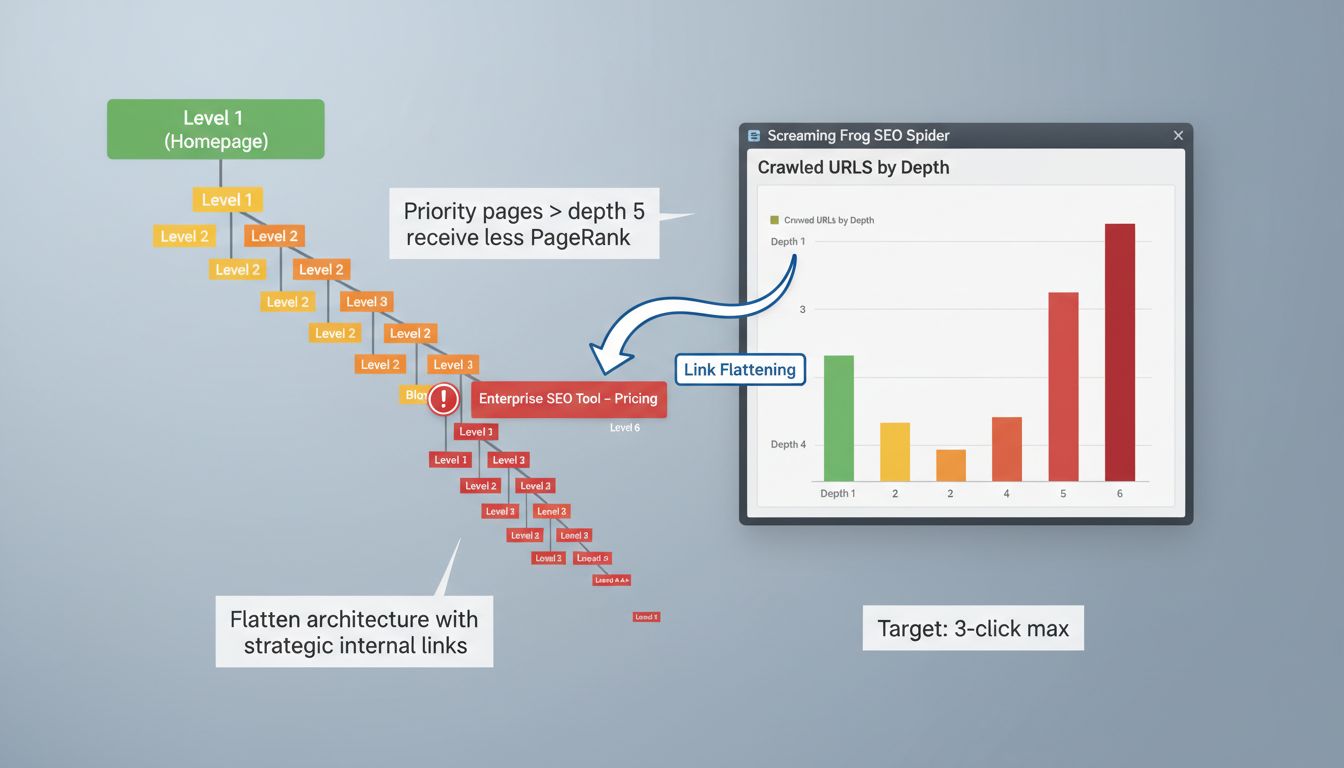
Navigate to the Overview tab in Screaming Frog and find the 'Crawled URLs by Depth' graph. This shows how many clicks from the homepage each URL requires.
Here's the thing: pages deeper than a crawl depth of 5 are typically poorly ranked because they receive less internal PageRank Source: verbolia.com. Your priority pages should be within 3 clicks.
Cross-reference that depth data with your list of commercial and cornerstone pages. Identify anything sitting at depth 4 or deeper. Then "flatten" the architecture by creating new internal links to those pages from shallower ones, your homepage, category pages, top-performing blog posts.
Common Mistake Spotlight: Using rel="nofollow" on internal links. This tells search engines not to pass SEO value through the link. Use SE Ranking or Screaming Frog's custom search to find rel="nofollow" attributes on internal links and remove them. There's almost no valid reason to nofollow a link within your own site, and doing so quietly breaks your whole internal linking strategy.
Step 2: Design Your Crawl-Efficient Site Architecture
You know what's broken now. The audit gave you orphan pages, excessive crawl depth, wasted links. This step is about turning that mess into something deliberate, a structure where crawlers can navigate efficiently and find your most valuable pages first.
The goal isn't to add random links. It's to build an architecture that systematically distributes authority (PageRank) and signals topical relevance. A chaotic link graph confuses crawlers. A clean one tells them exactly which pages matter.
Choosing Your Architectural Model: Hub-and-Spoke vs. Hierarchical
Don't think about designing from scratch. You're retrofitting an existing site. Pick the model that fits your content reality.
Hub-and-Spoke (Topic Clusters) is the go-to for content-rich sites building topical authority. You create a central "pillar" page covering a broad topic, then link it to all related, detailed "cluster" pages. Each cluster page links back to the pillar. A pillar on "Technical SEO" would link to spokes on "Core Web Vitals," "XML Sitemaps," "Canonical Tags", creating a dense, semantically linked cluster that search engines read as genuine expertise. A pillar commonly supports around 8 to 20 related pages Source: floyi.com.
Hierarchical (Parent-Child) is the safe default for most B2B and SaaS sites. Home > Product > Features > Feature Detail. Simple for users, transparent for crawlers. If your site is primarily service pages, case studies, and a modest blog, this is probably where you land.
Flat Architecture only works for tiny sites (under 50 pages). If you're reading this, your site isn't tiny. Skip it.
The 1-3 Click Rule in Practice
Pages deeper than a crawl depth of 5 are typically poorly ranked because they receive less internal PageRank Source: verbolia.com. That's the theory. Here's what you actually do with it.
Take your list of priority commercial pages from your planning phase. Cross-reference it with the "Crawled URLs by depth" data from your Screaming Frog audit. Any priority page sitting at click depth 4 or deeper is a problem.
You need to build a "link elevator." A direct, contextual link path from a high-authority page, your homepage, a top-tier category page, down to that buried priority page.
The most effective method: find relevant, well-linked blog posts and add a contextual link straight to your deep product or feature page. It bypasses the inefficient navigation and injects authority directly where it needs to go.
Action: Draw Your Target Link Architecture
Grab a whiteboard or open something like Whimsical or Miro. This isn't about making something pretty. It's about getting clear.
- Place your homepage at the top of the canvas.
- Directly below it, place your main category or hub pages (e.g., "Services," "Blog," "Product").
- Now, for each hub, list its cluster pages. Draw a line from the hub to each cluster page. These are your primary internal links.
- Draw a line back from each cluster page to its hub. This creates the reciprocal link.
- Finally, identify "cross-cluster" links. Where does a blog post about a problem naturally relate to a service page that solves it? Draw that line. A "React performance optimization" article should link to your "Frontend consultancy" service page.
The resulting diagram is your execution blueprint for Step 3. It answers the key questions visually: what to link, and from where.
You're not guessing anymore. You're engineering a system, and that's the whole point of a real internal linking strategy.
Step 3: Execute Your Linking Plan (What to Link, From Where, and How)
Your blueprint is ready. Now you build. This is where most teams fall apart, random links, no system, wasted effort.
Open your CMS. You're adding links based on your architecture diagram, not intuition.
Start with your highest-priority target pages from Step 1, the orphaned and deep pages that need authority. For each target, find 4-5 relevant source pages from your audit. Pages already ranking, getting traffic, or sitting high in your hierarchy.
Add one contextual link from each source page to the target. Place it naturally where the topic comes up, ideally within the first 2-3 paragraphs of the main content. Not a sidebar or footer link. Woven into the body.
Aim for a minimum of 8-10 inbound internal links to get a page properly indexed, based on what's been observed in industry commentary. If you're struggling to find 8 relevant source pages, your content clusters are probably too sparse.
After your next crawl, check the target page's "Inlinks" count in Screaming Frog. You should see the number go up.
Anatomy of a High-Value Internal Link: A Practical Example
Don't just add links, engineer them. Every link should pass maximum value. Here's what that looks like:
- Source Page Authority: The page giving the link has existing strength. It ranks for related keywords, has external backlinks, or gets organic traffic. Linking from a page nobody visits helps no one.
- Contextual Relevance: The link sits within content that's topically related to the target. Linking from "Python data analysis" to "CRM software" is noise. Linking to "Pandas library tutorials" is signal.
- Descriptive Anchor Text: The clickable text tells users and crawlers exactly what they'll get. "Learn how to configure webhook authentication" is good. "Click here" is a wasted opportunity. Use keywords naturally, but don't hammer the same exact-match commercial anchors over and over.
- Destination Page Value: The target is a high-quality, final destination. It answers the query implied by the anchor text. Never link to thin or placeholder pages.
Finding the Best Source Pages with Ahrefs and Sitebulb
Your architecture tells you the "where." These tools find the precise "from where" based on existing content.
First, use Ahrefs' Internal Link Opportunities report. It cross-references pages already ranking for keywords with other pages on your site that mention those keywords but don't link. Explicit missed connections, all in one place.
Second, run Sitebulb's Content Search. Trying to boost your target page on "technical SEO audit"? Search your site for "site audit" or "crawl budget." Sitebulb lists every page containing that text, each one a candidate for adding a contextual link to your target guide.
Manually reviewing 50 pages for relevance is slow. These tools surface the most relevant pages instantly. I use this workflow in Spectre to automate source page suggestions during the content optimisation phase.
Common Mistakes and How to Avoid Them
Watch for these. They'll dilute your entire internal linking strategy.
Over-Optimisation: Stuffing anchor text with exact-match commercial keywords ("best HR software London") looks manipulative. Vary your anchors. Use partial matches ("our HR software guide"), branded terms ("Spectre's keyword research tool"), or plain-language descriptions.
Under-Linking: Leaving important commercial or pillar pages with only 1-2 internal links. A study of 23 million internal links found pages with more incoming links tend to receive more traffic (Source: Zyppy). If a page matters, give it 10-20 quality inbound links from across your cluster.
Wrong Placement: Burying key links in footers, sidebars, or the "related posts" block at the bottom of an article. Contextual placement within the main body carries more weight. The first link to a page from a new source is the most important, make it early.
Ignoring New Content: Publishing a new post and forgetting to link it into your existing architecture. That page is now an orphan. Schedule a monthly "linking round" where you review the last 30 days of content and integrate it into your clusters. Link Whisper or a simple rule in your publishing workflow handles this well.
Step 4: Measure Impact and Run SEO A/B Tests
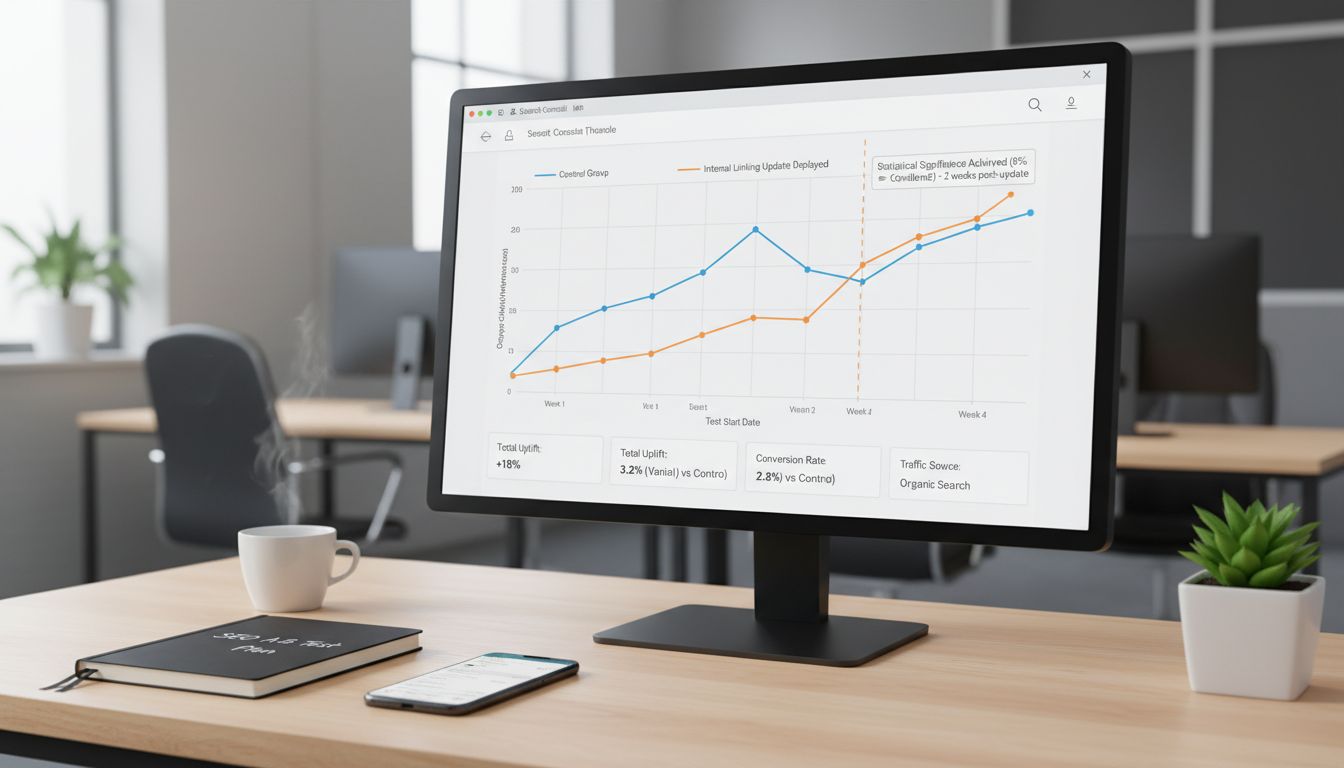
Your linking work is done. Now you need to know if it actually moved the needle. Most teams stop here, they make changes and hope. You're going to run controlled experiments instead.
The goal is simple: validate that your changes caused the improvement, not just correlated with it. You want statistically significant lifts in your target KPIs. Not anecdotal "traffic is up" stories.
Setting Up a Valid SEO A/B Test
Pick one primary KPI. Clicks to a specific target page group, organic sessions for a cluster, or impressions for newly-linked orphan pages. Don't measure everything at once, you'll dilute your signal.
Next, create your control and variant groups. Select 50-100 pages with similar traffic, indexation status, and content quality. Split them randomly. Your variant group gets the new internal links; your control group stays exactly as it was. This controls for external factors like seasonality or algorithm updates.
Make your linking changes to the variant group only. Then wait.
SEO A/B testing requires patience, you need 2-4 weeks to account for crawl and indexing delay. Use Google Optimize or a simple statistical package (I use Python's SciPy) to monitor for 95% confidence. If you see a 10-15% lift in your variant group's KPI that holds for two full weeks, you've got a winner.
Key Metrics to Monitor in Google Search Console
Open Search Console immediately after deploying your links. Watch these reports:
-
Index Coverage: Navigate to Pages > Why pages aren't indexed. Filter for your target orphan pages. Are they now being indexed? Dynamic internal linking has boosted indexation rates from roughly 40% to over 90% for marketplaces (Source: getcde.com). That's your first win.
-
Impressions & Clicks: Go to Performance > Pages. Filter for your variant group pages. Look for sustained upward trends in both metrics, not just one-day spikes. A valid signal shows impressions and clicks rising together over 14+ days.
-
Crawl Stats: In Settings > Crawl stats, watch "Crawl Requests" and "Average Response Time". A more efficient internal link structure should mean fewer total requests to discover your important pages. If crawl requests drop while indexation rises, you've successfully reduced crawl waste.
Case Study: Interpreting the Signal
Look at IFTTT's documented results. They achieved 33% year-on-year organic traffic growth after implementing a systematic internal linking strategy. The key insight isn't the percentage, it's what made up that growth.
They didn't just see "more traffic." Indexation of deep product pages improved, crawl budget shifted from informational content to commercial pages, and the average number of ranking keywords per target page increased. That multi-metric confirmation is what separates correlation from causation.
When you see your own results, look for this pattern. Are your newly-linked pages getting indexed? Are they receiving more impressions? Are they ranking for more keywords?
If all three trend upward, your internal linking strategy is working as engineered. If only one moves, investigate, you might have fixed a technical issue but missed the relevance signal.
Step 5: Scale and Maintain with AI and Automation Tools
Manual linking is a tactical win. Automated linking is a system.
You've fixed the broken links, designed the architecture, and executed the plan. Now you need to maintain it as your site grows from hundreds to thousands of pages. This is where AI and automation tools stop being optional.
The goal is to move from a one-time project to a continuous, self-improving process. You're building a content engine, not just patching holes.
Review of Leading AI and Automation Tools
Match the tool to your specific bottleneck.
Quattr is an AI-driven dynamic linking platform built for large, complex sites. If you're running a marketplace, media site, or any property where manual linking is impossible, this is your solution. It analyzes your entire site in real-time and creates contextual links dynamically. In one case study, a dynamic internal linking implementation increased indexation rates from roughly 40% to over 90% for a marketplace. Source: getcde.com
InLinks takes an entity-based approach. It builds a knowledge graph of your content and suggests links based on semantic relevance, not just keyword matching. Particularly effective for building topical authority and AI search visibility.
For WordPress teams, Link Whisper and LinkBoss are the workhorses. They analyze your existing content as you write and suggest relevant internal links inline while you're editing. Low friction.
Surfer SEO offers semantic internal linking powered by LLMs. It audits your content library and suggests links based on topical relevance and content similarity, going beyond simple keyword matching.
Enterprise SEOs use Oncrawl and Botify for deep analytics and monitoring. These platforms give you the data to understand link equity distribution at scale, but they're analysis tools first, automation engines second.
How to Integrate Automation into Your Workflow
Start with a clean base. Run through Steps 1-3 first. Automation tools work on "garbage in, garbage out", if your architecture is broken, they'll just automate the brokenness.
Use automation for maintenance and scaling, not initial cleanup. Once your foundation is solid, let the tool:
- Suggest links for all new content as it's published
- Identify orphan pages you missed in your manual audit
- Monitor for new linking opportunities as your topical clusters expand
Always review AI suggestions. An AI might suggest linking "project management" to a software feature page when the link should really go to your methodology guide. You provide the editorial judgment; the tool provides the scale.
Schedule quarterly audits even with automation running. Tools drift, new content patterns emerge, and your business goals change. Set a calendar reminder to export fresh Screaming Frog data and compare it against your automation tool's output.
Where Spectre Fits In: Automating the Content Side
Once your linking architecture is engineered, you hit the next bottleneck: content production. You need a steady stream of high-quality, topical articles to populate your hub-and-spoke clusters.
This is where Spectre transforms the system.
Spectre is an AI-powered SEO content tool that researches keywords, writes optimized articles, and publishes them directly to your CMS. The difference for internal linking: it understands your site's structure.
You can guide Spectre to create content that naturally fits into your existing architecture. Tell it to write cluster content for your "B2B SaaS pricing" pillar page, and it will research and produce articles on tiered pricing, value metrics, and negotiation tactics, all with appropriate internal links already baked in.
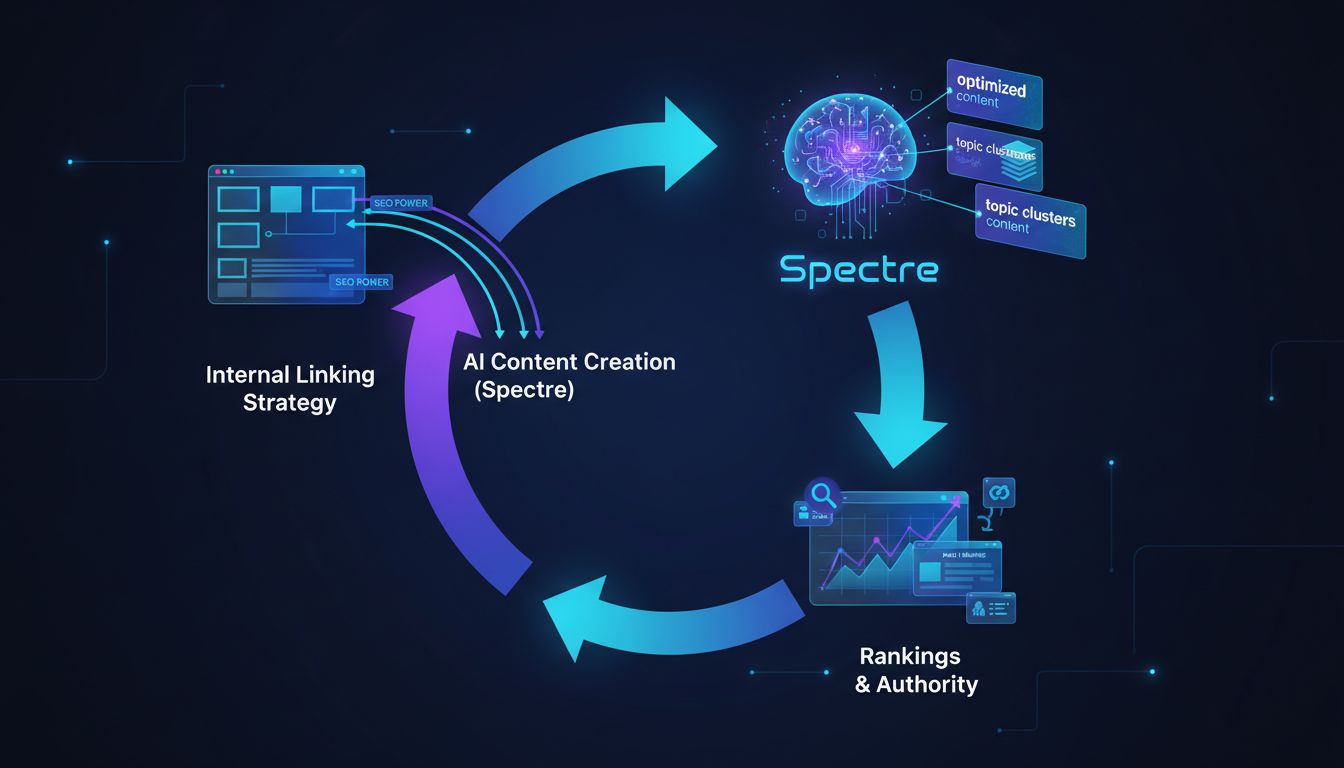
The automation creates a virtuous cycle. Your internal linking strategy directs authority to important pages. Spectre creates optimized content for those pages. That new content earns more external links and rankings, which flows more authority back through your internal links.
You stop thinking about individual links and start operating a content engine. As the founder or technical marketer, you focus on strategy and high-level architecture while the system handles execution at scale.
Common Mistakes and Troubleshooting Guide
Even with a solid plan, execution goes sideways. I've watched teams waste months on their internal linking strategy because they missed a handful of critical errors. Here's what I see most often, and how to fix it.
Mistake 1: Ignoring Index Bloat and Crawl Waste
Symptom: Googlebot is active in your crawl logs, but new pages aren't getting indexed. The bot is stuck crawling thousands of low-value pages, tag archives, filtered views, thin content.
Root Cause: Index bloat. Too many low-quality pages are eating your crawl budget. One cleanup effort that combined pruning URLs with improved linking produced a 58% traffic increase in 90 days.
Fix: Run a Screaming Frog crawl and export all indexed pages. Identify the junk, thin content, duplicates, pagination, and apply noindex or canonical tags. Prune your XML sitemap down to only the pages worth crawling.
That frees up the budget for pages that actually matter.
Mistake 2: Over-Linking or Using Poor Anchor Text
Symptom: Key pages have 100+ internal links pointing at them. Or every single link to your "SEO services" page uses the exact same commercial keyword.
Root Cause: The belief that more links always means more power. It doesn't. You end up with a spammy pattern, not a readable site.
Fix: A target page needs roughly 8-10 inbound links to get indexed properly. Aim for 3-5 contextual links from relevant, high-authority sources. Use varied, descriptive anchor text, "learn our technical SEO audit process" beats "click here" every time.
Mistake 3: The 'Set-and-Forget' Mindset
Symptom: You ran a solid linking project six months ago. Since then, 50 new posts have gone live with zero internal links connecting them to anything.
Root Cause: No maintenance process. Internal linking gets treated as a one-time project instead of an ongoing system.
Fix: Block 30 minutes monthly to run a quick Sitebulb content search for new keyword mentions. Use your automation tool (Link Whisper, Spectre's AI, whatever you're running) to generate link suggestions for new content. Add "2-3 internal links" as a non-negotiable step in your publishing checklist.
Mistake 4: Using rel="nofollow" on Internal Links
Symptom: You've added contextual links, but authority isn't flowing where it should.
Root Cause: The rel="nofollow" attribute tells search engines not to follow the link or pass equity. It sometimes gets applied site-wide by CMS plugins or developers who added it for external links and didn't scope it correctly. SE Ranking confirms nofollow internal links pass zero SEO value.
Fix: Audit for this. Use SE Ranking's site audit tool or a custom Screaming Frog search to find internal links carrying the nofollow attribute. Remove it from any internal link that should pass value. All internal links should be dofollow.
Conclusion
You now have a complete engineering system for a high-impact internal linking strategy. Not randomly adding links, actually building a crawl-efficient architecture that directs authority and turns your site into a self-reinforcing SEO asset.
The sequence matters: audit first to eliminate technical waste, design your architecture, execute with precision, measure with controlled experiments, then scale with automation. The data backs this up, systematic linking drives 30-40% traffic gains [Source: tryansly.com], and dynamic systems can push indexation from 40% to over 90% [Source: getcde.com].
Stop treating internal linking as a content afterthought.
It's a core technical infrastructure project. It determines how search engines and AI systems discover, understand, and rank your work. The tools are already out there, Screaming Frog for auditing, Quattr for automation, so you're not doing this by hand.
If you need to scale this while also scaling content production, Spectre can automate the research, writing, and internal link suggestion process, integrating directly with your CMS. Start your free trial and see how AI-powered content creation frees you up to focus on strategic SEO architecture.
Frequently Asked Questions
What is an internal linking strategy?
An internal linking strategy is a systematic plan for managing the links between pages on your own website. It distributes authority to your most important pages, strengthens topical authority, and guides visitors to relevant content. Think of it as building the nervous system for your site, not just throwing in random links.
What is an example of an internal link?
A good internal link uses descriptive, keyword-rich anchor text placed in context. Instead of "Click here to learn about our SEO tool," you'd write: "Our guide on how to do keyword research explains the first step." The anchor text describes the target page, gives context, and passes topical signals to search engines.
What does internal linking do?
Internal linking does three things. It guides crawlers through your site so they find the right pages. It establishes topical relationships so search engines understand what your content is about. And it moves PageRank from strong pages to newer or weaker ones that need a boost.
What are the 4 types of links?
There are four: 1) Internal Links: same domain, page to page. 2) External Links (Outbound): your site pointing out to another domain. 3) Backlinks (Inbound): another domain pointing to you. 4) Nofollow/Sponsored/UGC Links: links with a rel attribute telling crawlers not to pass authority.
For internal linking strategy, you're focused on standard internal (dofollow) links only.
What is the difference between internal and external linking with example?
Internal linking keeps authority moving within your site. External linking sends it out to other sources. Linking from your blog post to a Wikipedia page is external. The practical difference: external links bleed authority away, internal links keep it circulating.
What are the 3 C's of SEO?
The "3 C's" are Content (valuable, relevant information), Code (technical health and performance), and Credibility (authority signals like backlinks and engagement). A solid internal linking strategy sits at the intersection of all three. It's a technical implementation that makes your content easier to find and understand, which search engines read as credibility.