April 29th, 2026
How to Do Internal Linking for SEO: A Practical Guide for SaaS Sites
 WD
WDWarren Day
A 25% traffic lift from links you already control. No outreach required.
Search Pilot ran an internal linking test across category pages and got exactly that, 25% more organic traffic, thousands of additional sessions per month. IFTTT hit 33% year-over-year growth by making internal linking a priority.
This isn't a coincidence.
Most guides tell you to "link naturally" and leave you to figure out the rest. This one is an engineering-driven framework built specifically for SaaS sites: audit your current state, prioritise pages using a value matrix, architect a hub-and-spoke model, implement with technical precision, automate at scale, and measure impact with attribution.
A repeatable system, not a one-off task.
You'll learn how to do internal linking with a surgical Screaming Frog audit, how to prioritise pages that actually move the needle, how to structure topical authority clusters, and how to avoid the JavaScript rendering pitfalls that quietly kill your results. Plus how to automate the whole thing so it scales with your content pipeline.
The opportunity is sitting in your existing content architecture. You just haven't unlocked it yet.
Before You Start: Prerequisites for a Scalable Strategy
Before you touch a single link, confirm you have these four things in place. Missing any one of them will slow you down.
Skill assumptions
You should know basic SEO concepts, keywords, backlinks, how to read Google Search Console data. You also need working knowledge of your CMS, whether that's WordPress, Webflow, Contentful, or a custom headless setup. This isn't theoretical. You'll be exporting page lists and editing content.
Required toolset
Install Screaming Frog SEO Spider for crawling your site. The free version handles 500 URLs, which is enough for most early-stage SaaS audits.
You'll also need access to an authority metric tool like Ahrefs or Semrush. If budget is tight, Moz's free Domain Authority checker works as a directional proxy, but Ahrefs' Domain Rating (DR) is the industry benchmark for assessing your competitive ceiling.
Access requirements
Get admin-level access to your CMS so you can make site-wide changes. And set up a staging environment before you do anything else.
Testing internal linking changes directly on your live site is reckless. You can inadvertently harm rankings or create crawl issues. A staging site lets you verify links work and measure impact before anything goes live.
Mindset prerequisite
Approach this as building a system, not a one-off task.
You're designing a repeatable process that integrates with your content pipeline. Think in terms of controlled experiments where you isolate variables and measure outcomes. That's what separates a tactical fix from something that actually compounds over time, and it's the mindset behind learning how to do internal linking properly in the first place.
Step 1: Conduct a Surgical Internal Link Audit
First job: map what you actually have. You need a complete picture of your current internal linking structure before you can improve anything. Not impressions. Real data, extracted from the site.
Open Screaming Frog SEO Spider, set the mode to "List" and crawl your sitemap URL. Once the crawl finishes, you're ready to export and analyze.
1. Export the 'All Inlinks' Report
Navigate to Reports > All Inlinks. This CSV shows every internal link pointing to each page on your site. Sort the "Inlinks" column and you'll immediately see which pages are getting all the love and which are being ignored.
2. Identify Orphan Pages
Orphan pages have zero incoming internal links. Search engines struggle to find and index them, which wastes crawl budget.
In Screaming Frog, use the filter: Filter > Inlinks > Internal = 0. This isolates every page living in isolation.
The impact is real: Daydream's case study showed that fixing orphan pages and poor architecture led to a 73% reduction in crawl waste and 81% faster indexing Source: withdaydream.com/library/insights/internal-linking-seo. Fix these first.
3. Find Underlinked High-Value Assets
Cross-reference your "All Inlinks" data with your business goals. Pull together a separate list of your commercial pillars: pricing pages, core feature pages, high-intent landing pages.
Any page with real conversion potential that has fewer than 3-5 internal inlinks is underlinked. That's your first candidate list for how to do internal linking that actually moves revenue.
4. Audit for Technical Debt
Broken links are obvious. Internal redirect chains are not, they're a silent drain, forcing Googlebot to burn clicks following 301s instead of discovering content.
In Screaming Frog, go to Reports > Redirect Chains to find them. Then run a Site Audit in Google Search Console to catch any broken internal links (404s) you may have missed.
5. Verify JavaScript Crawlability
A lot of modern SaaS sites and AI linking tools (like InLinks) inject links via JavaScript. If the link isn't in the raw HTML, Google may not see it. This was a key challenge in the IFTTT case study Source: uproer.com/articles/ifttt-saas-case-study.
In Screaming Frog, compare the "Raw HTML" and "Rendered HTML" for key pages. Use View > Rendered to confirm your JS-powered links are actually being rendered for crawlers.
Your Deliverable: Two documents before you move on:
- A Priority Targets spreadsheet listing orphan and underlinked commercial pages.
- A Technical Debt log of broken links and redirect chains to fix immediately.
That's your foundation. Everything you add from here has a reason behind it, not just a guess.
Step 2: Prioritize Pages Using the SaaS Link-Value Matrix
Audit done. Now you have a list of problems, and the real question is what to fix first.
The 80/20 rule applies here: 80% of your linking effort should go toward the 20% of pages that actually drive conversions and authority. Generic advice doesn't cut it, you need a SaaS-specific framework.
First, identify your target pages, where you want to send link equity. Prioritize in this order:
- High-Intent Commercial Pages: Pricing, contact, demo request, and free trial sign-up pages. These directly convert visitors.
- Core Product/Feature Hubs: Central pages explaining your core offering. Often your "money" pages.
- Strategic Pillar Content: Comprehensive guides that establish topical authority for your primary service categories.
- High-Performing Blog Content: Posts that already rank well and pull in qualified traffic.
Second, identify your source pages, where you have authority to give. These are pages with high Domain Rating (DR) or Ahrefs URL Rating (UR) and existing organic traffic. Your homepage, key pillar pages, and top blog posts are the obvious candidates.
Now plot them on a simple 2x2 matrix. The goal is moving pages from the lower-right quadrant to the upper-right.
- High Authority / Low Value (Give): Your homepage or a top-ranking blog post. Ideal source pages.
- Low Authority / High Value (Get): Your underlinked pricing page or a key feature hub. Primary targets.
- High Authority / High Value (Protect & Nurture): Your flagship pillar page. Keep its internal link structure intact.
- Low Authority / Low Value (Ignore or Consolidate): Thin, outdated posts. Consider redirecting them to stronger content.
The initial move is simple: connect your "Give" pages to your "Get" pages.
Here's the counterintuitive part. Linking from a high-authority commercial page like /pricing to a deep, relevant blog post is often more valuable than the reverse. You're using commercial authority to boost informational content that supports the buyer's journey. Most people get this backwards when figuring out how to do internal linking.
Finally, apply the 3-Click Rule. Use Screaming Frog to check that no critical target page sits more than three clicks from your homepage. Pages within three clicks get crawled 50% more efficiently. If your demo page is buried four levels deep, surface it now through strategic links from your navigation or highest-traffic pages.
Step 3: Architect a Hub-and-Spoke Model for Topical Authority
Want to signal real expertise to search engines? Stop randomly sprinkling links. You need to structure your content into topic clusters.
This is the hub-and-spoke model, and it's how you build topical authority for your SaaS.
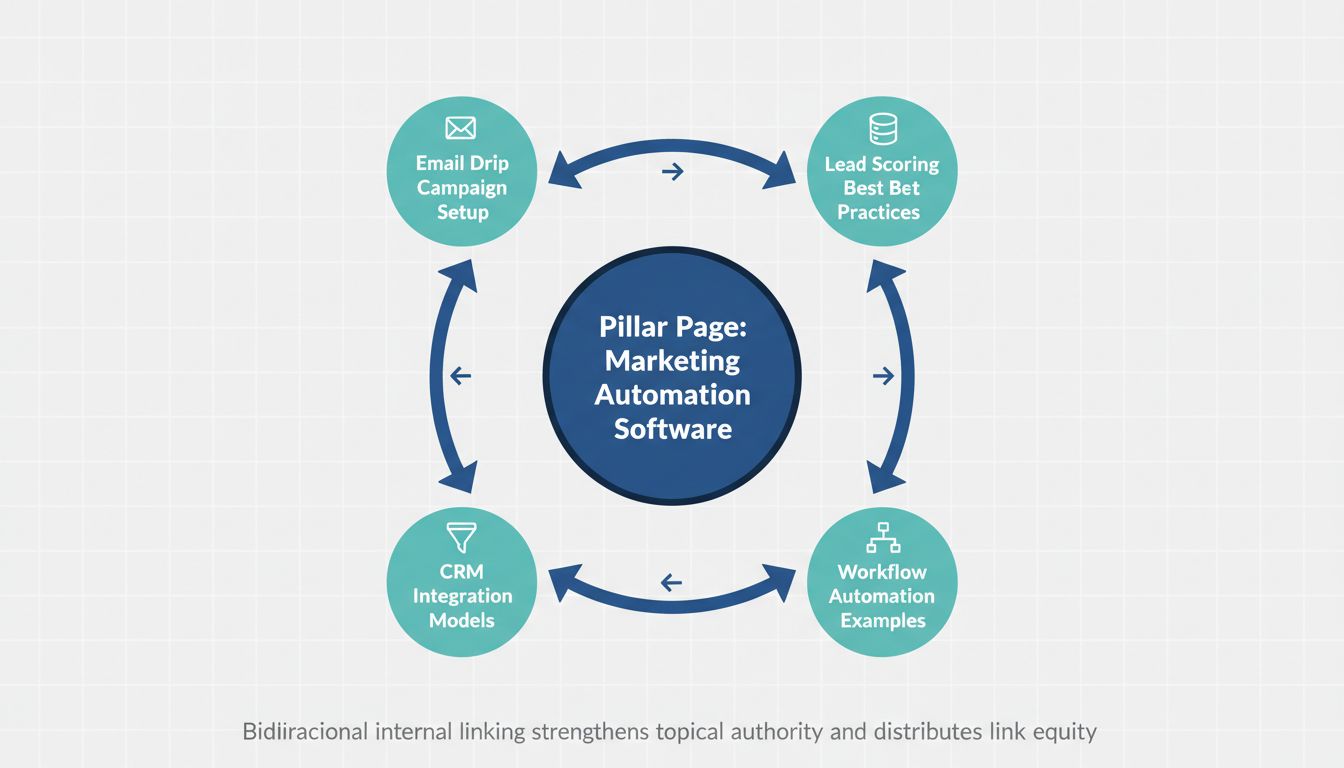
The principle is simple: one comprehensive pillar (hub) page covers a broad, high-intent topic. Multiple cluster (spoke) pages address specific subtopics. Every cluster page links to the pillar, and the pillar links back to all relevant clusters, a dense web of relevance.
Think of it like this:
- Pillar (Hub): "Marketing Automation Software"
- Clusters (Spokes): "Email Drip Campaign Setup," "Lead Scoring Models," "CRM Integration Best Practices," "Workflow Automation Examples"
This structure tells Google your site is a definitive resource on marketing automation, not just a pile of loosely related articles. The bidirectional link flow concentrates authority on the pillar while distributing it to the clusters.
HubSpot reportedly achieved a 40% increase in organic traffic in six months by implementing this model.
For SaaS, your most valuable hubs aren't just blog categories. Build them around:
- Product Feature Hubs: A page for "Project Management" that links to deep dives on Gantt charts, time tracking, and resource allocation.
- Solution Pages: "CRM for Startups" linking to articles on lead capture, pipeline management, and startup pricing.
- Comprehensive Guides: "The Ultimate Guide to SaaS SEO" connecting to chapters on technical audits, content clustering, and link building.
Here's how to map your first cluster in 20 minutes, this is essentially how to do internal linking in a way that actually compounds over time.
1. Pick one core topic. Start with your highest commercial intent keyword. 2. Identify or create the pillar page. This should be a substantial, cornerstone piece of content. 3. List 5-7 existing cluster articles. Use your site search or a content inventory. These are your spokes. 4. Implement the links. Edit every cluster page to add a contextual link to the pillar. Then edit the pillar to add a section (like "Related Resources") linking out to each cluster.
Run a quick technical check. Use Screaming Frog's "Internal > All Inlinks" report filtered to these URLs. You want to see a dense link matrix between them.
If a cluster page only has one link (to the pillar), it's under-linked. Find another relevant page in your audit to point to it.

The surprising part? This isn't just for new content. Your most powerful hub might already exist, just sitting dormant because its cluster pages are orphans.
Find that page and activate it.
Step 4: Implement Links with Engineering-Grade Best Practices
You know where to link. The how determines whether Google sees a relevant connection or spam. Apply these rules to every link you create.
Craft Optimal Anchor Text
Stop using "click here" or "learn more". Write anchor text a user would naturally highlight. Think about the exact phrase someone would search for to find the target page.
For a balanced, natural profile across your site, aim for this distribution:
- 40–50% Branded: "Our pricing", "Acme Analytics dashboard"
- 35–45% Partial Match/Descriptive: "compare project management tools", "guide to API rate limits"
- 5–15% Exact Match: "SaaS pricing", "internal linking strategy"
Source: Anchor Text Strategy for SaaS Link Building
This isn't a rigid law, don't tally every link. The goal is to avoid a profile where 80% of your anchors are the exact keyword you're targeting, which can trigger spam filters.
When in doubt, be descriptive.
Determine Link Quantity
How many contextual links should a page have? Conflicting advice is everywhere. For a typical 1,000-word SaaS article, aim for 3–7 contextual links.
That's roughly one relevant link every 150–300 words. If you're forcing a link into every paragraph, you've gone too far. If a page has zero links to your commercial content, you've missed an opportunity.
Prioritize Link Placement
Not all links are equal. Search engines and users assign value based on context.
- Contextual (In-Body): The gold standard. A link embedded naturally within your paragraph text passes the most "editorial" weight.
- Structured Lists: A "Related Articles" or "Next Steps" section at the end of a post is valuable but carries less weight than contextual mentions.
- Sitewide (Header/Footer): These help navigation but dilute link equity across every page. They have their place, a Search Pilot test found footer links provided a 5% uplift to destination pages, but they're not a substitute for contextual linking.
Execute the HTML Correctly
The technical implementation matters. Here's clean, effective HTML:
<a href="https://yoursite.com/pricing" title="View our plans and features">SaaS pricing</a>
Common engineering mistakes to avoid:
- Linking to redirects: Point directly to the final
200 OKURL, not a URL that 301s. Redirect chains waste crawl budget. - Using non-canonical URLs: Ensure the
hrefpoints to the canonical version of the page (usually the HTTPS version). - Incorrect relative paths: If you use relative paths (
/pricing), verify your site's base URL is configured correctly to avoid broken links.
How to Make an Internal Link in Common CMSs
The mechanics vary by platform.
WordPress (Gutenberg Editor):
- Highlight the anchor text in your paragraph.
- Click the link icon in the toolbar or press
Ctrl+K(Cmd+K on Mac). - Start typing the title of the page you want to link to. WordPress will search your site and suggest matches.
- Select the correct page and click "Apply".
Webflow:
- In the Designer, highlight text within a Rich Text element.
- In the settings panel that appears, click the link icon.
- Choose "Page" from the dropdown and select the page from your site map.
Headless (e.g., Contentful):
- In your Rich Text field, highlight the anchor text.
- Use the toolbar's link icon or the
/command to insert a link. - Search for and select the entry (e.g., a Blog Post or Page entry) you want to link to. The platform will store the entry's ID, and your front-end code will resolve it to the correct URL at build time.
The principle is the same across all of them: select text, connect it to a destination. That's really how to do internal linking at the implementation level, the system just abstracts the underlying HTML.
Step 5: Automate at Scale with AI and CMS Integrations
Manual linking doesn't scale. Once your strategy is set, you need systems that suggest or insert links automatically, without sacrificing quality or crawlability.
Start by looking at AI-powered linking tools like KoalaLinks or InLinks. They use natural language processing to analyse your content and surface relevant link opportunities. KoalaLinks produced a 52% increase in user engagement on a site with 150k monthly pageviews in an A/B test. The results can be real, but the implementation is where things go wrong.
Here's the non-negotiable check before committing to any tool: verify how it injects links. A lot of these tools use JavaScript to insert links into the DOM after the page loads. If those links aren't in the raw HTML source, Google's crawler may never see them.
This exact problem caught IFTTT out, their JavaScript-rendered links were invisible to crawlers, which undermined the whole thing. Use your browser's "View Page Source" or Screaming Frog in "Raw HTML" mode to confirm links actually appear in the HTML, not just the rendered page.
For deeper control, build a custom automation workflow using your CMS's API. Most modern platforms like Contentful or Webflow offer webhooks and content management APIs. The basic flow when content is published:
- Send the new article's text and topic tags to a processing script.
- The script compares this against your existing page index (built from your audit).
- It returns suggested link targets based on semantic similarity and your priority matrix.
- Those suggestions get appended to the CMS entry as editor notes, or auto-inserted into a "Suggested Links" field if you're confident enough to go that far.
A few developer gotchas worth knowing. If you're using Contentful webhooks, you need to implement HMAC SHA256 verification to authenticate incoming requests, their docs cover it, but teams skip this more than you'd think. All CMS APIs have rate limits, so your script needs exponential backoff logic to handle failed requests. And your script must validate that every suggested target URL returns a 200 OK and is the canonical version. Never automate linking to a redirect.
Wire this into your editorial process with a checklist for every new piece of content:
- Link to 3–5 existing, relevant pages using descriptive anchor text.
- Make sure the new page gets at least one incoming link from a relevant pillar or hub page within 48 hours of publishing (schedule it as a follow-up task).
- Verify all links are in the raw HTML source before final publication.
Automation isn't about removing human judgment. It's about making strategic linking the default, not something you remember to do on a good day.
Step 6: Measure Impact with Attribution and A/B Testing
Building the system is one thing. Proving it works is another.
Define your KPIs first. Primary metric: organic traffic to targeted pages, measured in Google Search Console clicks. Secondary: indexing speed (days from publish to first crawl) and average position for target keywords. Track conversions where you can, link clicks to pricing pages that turn into demo requests.
Run a controlled experiment. Pick two similar hub pages. Update one with new internal links, leave the other alone as a holdout. Change only the link structure on your test page. This is how you isolate the variable and rule out algorithm updates or seasonal noise.
Use GSC to attribute the change. Wait 2-4 weeks after implementing, then use the 'Compare' date range feature. Set the pre-change period as your baseline, the post-change period as the comparison.
You're looking for a divergence. If your test page climbs while the holdout stays flat, that's real evidence your links caused it.
Quick wins do happen, the seoClarity case saw a 9,500 weekly session increase within three weeks of adding new internal links. But the size of your uplift depends heavily on your site's existing authority. A DR 20 site won't see the same percentage gains as a DR 60 site. That's just how it works.
Document every test. A simple log: hypothesis, change made, date, 30-day result. Over time you'll start seeing patterns, maybe links from case studies to feature pages consistently outperform blog-to-feature links. That's the kind of thing you can't know without the log.
This is how to do internal linking as an actual discipline rather than a vague "best practice." Each experiment feeds the next decision.
Troubleshooting: Common SaaS Internal Linking Pitfalls
Even a solid strategy can break down on technical details. Here's what to watch for.
Problem 1: The Orphan Page
New blog posts or documentation pages launch with zero incoming internal links. Google can't find them, and they get none of your site's authority.
Symptom: Pages with strong content show zero "Inlinks" in Screaming Frog and never show up in Google's index after weeks.
Solution: Make linking mandatory. Add a step to your publishing checklist: "Link to 3–5 existing relevant pages and ensure 1–2 existing pages link back to this new URL."
Problem 2: JavaScript Crawlability Gaps
You use a dynamic CMS component or third-party app to insert "related posts." The links render for users but aren't in the raw HTML source Googlebot actually fetches.
Symptom: Links you can see in the browser don't appear in Screaming Frog's "Internal" tab when crawling with JavaScript disabled.
Solution: Audit your site's raw HTML monthly. Configure critical internal links server-side or via static generation, not client-side JavaScript.
Problem 3: The Redirect Chain Tax
Internal links point to /old-feature-name, which 301s to /new-feature-name. Every click wastes crawl budget and dilutes link equity passing through the redirect.
Symptom: Screaming Frog's "Internal Redirect Chains" report shows URLs with multiple hops.
Solution: Export the report and run a bulk find-and-replace in your CMS. Always link directly to the final, canonical URL.
Problem 4: Anchor Text Over-Optimization
You've linked "project management software" fifty times across your site. That looks manipulative and can trigger spam filters.
Symptom: Your anchor text report shows over 15-20% exact-match keyword usage.
Solution: Mix it up. Use branded terms ("our Gantt chart tool"), partial matches ("software for managing projects"), and natural phrases. Audit this quarterly.
Problem 5: Sitewide Link Dilution
Your footer has 30 links to every product page and blog category. Link equity gets spread so thin that no single page gets a meaningful boost.
Symptom: Important commercial pages buried in sitewide navigation fail to rank despite good content.
Solution: Prune. Search Pilot found that reducing links in a sitewide block improved rankings for the remaining links. Keep only what's essential in headers and footers, everything else goes.
This is a big part of how to do internal linking well. Not just adding links, but catching the things quietly working against you.
Conclusion
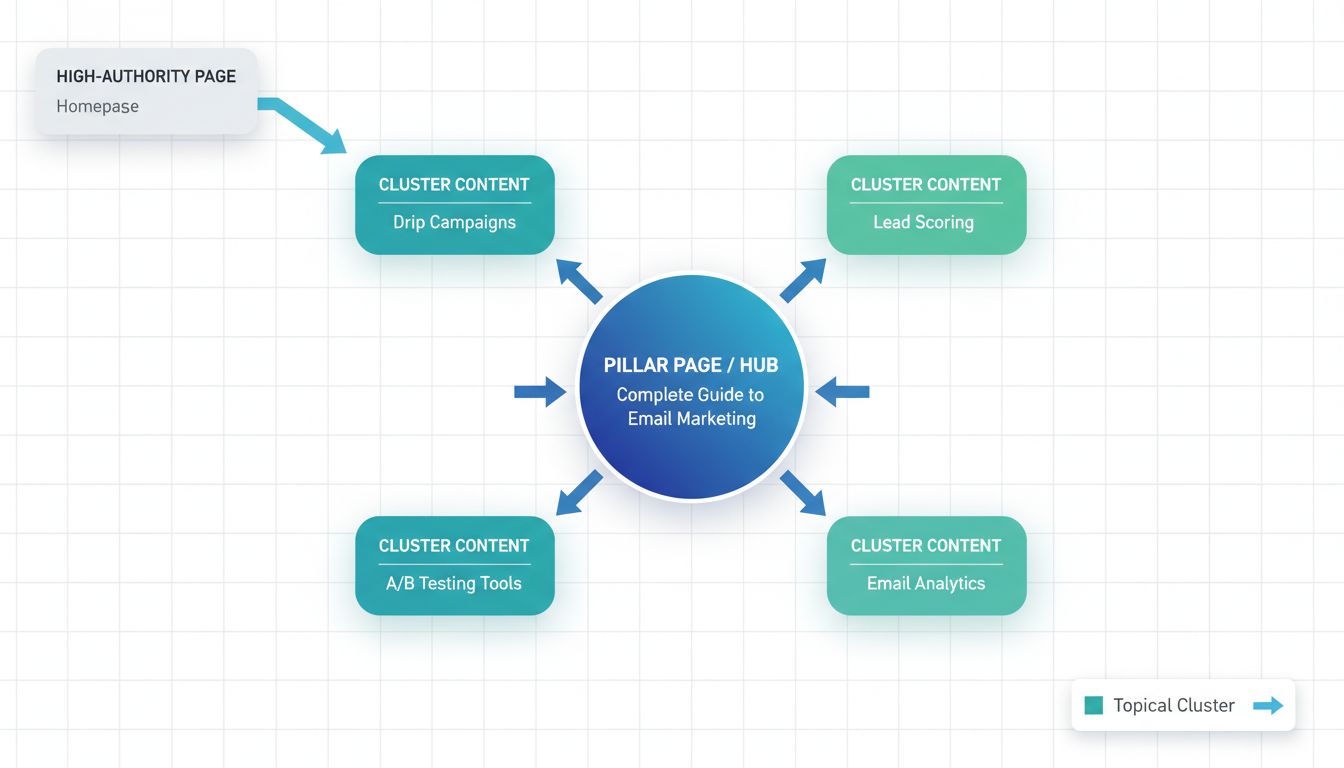
Internal linking for SaaS isn't about sprinkling random connections. It's an engineering discipline, audit your current state, build a hub-and-spoke model that signals topical authority, implement with precision, then automate and measure.
You're building a self-reinforcing network that guides both users and search engines toward your most valuable commercial pages.
The data backs this up. Search Pilot saw 25% traffic uplifts, IFTTT hit 33% YoY growth, and in both cases, linking was treated as a system, not an afterthought. [Source: inlinks.com, uproer.com]
Start small. Pick one content cluster. Run one controlled A/B test on link placement or anchor text, see what you learn, and let that inform the next move. That's how to do internal linking in a way that compounds over time, without waiting on external links.
Your first action: run the Screaming Frog "All Inlinks" audit this week. Find your top orphaned high-value pages, a pricing tier, a key feature page, a high-intent guide, and plan your first strategic links from a proven, high-authority source page.
Then measure the change.
Frequently Asked Questions
How do I create an internal link in HTML?
Use an <a> anchor tag with the href attribute pointing to the target page's path on your domain. Always use descriptive anchor text and include the full canonical HTTPS URL.
For example: <a href="https://www.yoursaas.com/pricing" title="View Pricing">Compare our SaaS pricing plans</a>.
This way crawlers can follow the link and users know exactly where they're going.
What is a concrete example of internal linking for a SaaS site?
Say you have a pillar page called "Complete Guide to Email Marketing Automation." It links out to cluster articles like "How to Set Up a Drip Campaign" and "Lead Scoring Models Explained," and those articles link back to it.
At the same time, a high-traffic post on "2026 Marketing Trends" links contextually to your "Marketing Automation Software" product page. That's the bridge from informational to commercial content.
How does internal linking actually work for SEO?
Two things happening at once. First, links give crawlers a path to discover and index your pages. Second, they pass PageRank around your site, so authoritative pages like your homepage can lift the ranking potential of pages that need help, like pricing or features.
Is SEO dead, or how has it evolved in 2026?
Not dead. Just different.
Modern algorithms care about topical authority and user experience signals now, not just keyword matching. That's why knowing how to do internal linking matters more than it used to. It builds topical clusters that signal expertise, and it keeps users moving through your site instead of bouncing.
The game shifted from optimizing individual pages to building interconnected content systems.
What is the 80/20 rule for SEO in this context?
80% of your SEO benefit will come from 20% of your links. So focus on linking from your most authoritative pages (homepage, top blog posts) to your highest-value commercial pages (pricing, core features, high-intent conversion paths).
Don't spread effort evenly. Concentrate it where the equity already exists and point it at the pages that actually move revenue.