June 30th, 2026
How to Use a WordPress AI Content Generator to Automate Your Blog
 WD
WDWarren Day
74.2% of newly created web pages contain AI-generated content. Yet only a tiny fraction of them actually drive SEO growth.
The gap isn't the technology. It's the implementation.
As a founder who's built an AI SEO platform, I keep seeing the same things wreck budgets and content strategies: runaway API costs, broken automation, security oversights from treating AI as just another plugin.
Here's the part most guides skip over: 87% of content marketers use AI, but only 2.5% of new pages are pure AI with no human editing. The 71.7% that are human-AI mixes dominate organic results.
That tells you everything.
Success with a WordPress AI content generator isn't about finding a magic button. It's about building a secure, cost-controlled system that fits your technical stack and actually supports your SEO strategy.
This guide is the architectural blueprint most competitors ignore. We're going past plugin recommendations into the full-stack stuff that matters: securing API keys, controlling token costs, building reliable automation, and setting up the human-in-the-loop workflow that moves rankings.
By the end, you'll have a configured pipeline from keyword research to published draft, with guardrails for quality, security, and scale.
Before You Start: Assess Your Stack and Budget
Most guides skip this step. They assume your WordPress installation can handle AI workloads and that API costs are trivial. Both assumptions are wrong.
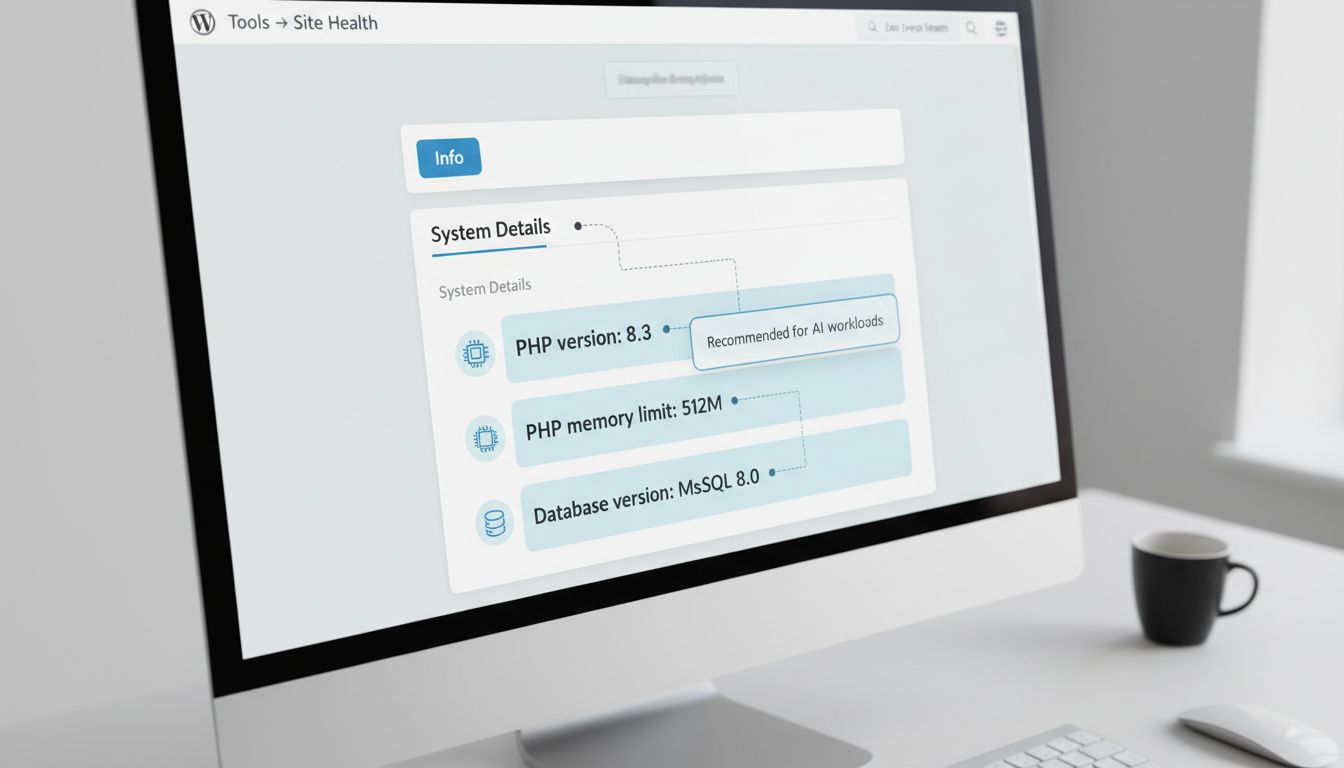
Start with a technical audit. Navigate to Tools → Site Health in your WordPress admin, click the "Info" tab, and check these three things:
- PHP version - You need at least PHP 7.4, but PHP 8.3 is strongly recommended. Many AI plugins use newer language features that perform poorly or fail on older versions.
- PHP memory limit - Set this to at least 512MB. The default 256MB will cause timeouts during longer content generation.
- Database - MySQL 8.0 or MariaDB 10.6 minimum. Older MySQL 5.x installations lack the JSON functions that AI plugins use for API communication.
If your hosting panel shows older versions, contact support before doing anything else. I've seen sites crash generating a 2,000-word article on PHP 7.2 with 128MB memory. Not fun.
Next, make the core architectural decision: self-hosted API versus plugin-as-a-service.
Self-hosted means you provide your own API keys to OpenAI, Anthropic, or Google. You control the models, costs, and data flow. Plugin-as-a-service bundles API calls into a monthly fee, simpler, but with potential vendor lock-in and less transparency.
For technical founders who want cost control and flexibility, self-hosted is the only viable path long-term.
The hidden cost most people miss is token economics. One token is roughly four characters or 0.75 words in English. A standard 1,000-word blog post consumes about 1,333 tokens. Using OpenAI's GPT-4o pricing ($0.03 per 1K input tokens, $0.06 per 1K output tokens), that post costs approximately $0.05-$0.07 in API fees. [Source: OpenAI pricing]
Here's a quick comparison:
| Model | Input (per 1K tokens) | Output (per 1K tokens) | 1,000-word post est. cost |
|---|---|---|---|
| OpenAI GPT-4o | $0.03 | $0.06 | $0.05-$0.07 |
| Anthropic Claude Haiku | $0.001 | $0.005 | $0.002-$0.008 |
| GPT-4 | $0.03 | $0.06 | $0.05-$0.07 |
Anthropic's Haiku is dramatically cheaper for basic content generation, about 10x less than GPT-4o. The tradeoff is reasoning capability for complex SEO analysis. Budget £20-£50 monthly for API fees when starting out, then adjust based on volume.
Before installing any wordpress ai content generator plugin, install your safety net: WP Rollback. This free tool lets you revert any plugin from the WordPress.org repository to a previous version.
When an AI plugin update breaks your workflow (and it will), you can roll back in seconds instead of losing days. This isn't optional. It's just basic operational hygiene.
Step 1: Choose Your AI Engine Based on Your Workflow
Don't choose a plugin based on its marketing copy. Choose based on how it fits into your actual workflow. The wrong choice here creates technical debt that's painful to unwind later.
First, eliminate any plugin with a poor security record. Bertha AI had multiple vulnerabilities reported in 2025 with CVSS scores between 4.3 and 5.3. [Source: WPScan, Wordfence]. Always check a plugin's last update date and search for its name alongside "CVE" before installing.
Compare the leading wordpress ai content generator options on operational grounds, not just features. Here's a decision matrix:
| Plugin | API Model | Key Workflow Feature | Best For Scenario | Cost Model |
|---|---|---|---|---|
| AI Engine (100k+ installs) | Bring-your-own keys (OpenAI, Anthropic, Google, Mistral) | Content/image generation, chatbots, internal API | Technical teams wanting maximum model control and custom integrations | Free core plugin; Pro from $59/year |
| Uncanny Automator | Bring-your-own keys (OpenAI, Anthropic) | Connects 100+ plugins/services to automate multi-step workflows | Automating entire content pipelines from keyword to publish | Free tier; Pro for expanded app credits |
| Rank Math Content AI | Integrated/bundled | SEO-optimised content tools built into Rank Math SEO plugin | Users prioritising on-page SEO and content planning within one interface | Part of Rank Math Pro subscription |
| Jetpack AI | Bundled with usage limits | Simple generation integrated into Jetpack ecosystem | Casual users needing basic AI features with a free allowance | 20 free requests/site; paid plans beyond |
Your choice comes down to one question: are you building an automated system or just generating individual posts?
If you're building a system, AI Engine paired with Uncanny Automator gives you the most control. You bring your own API keys, choose your models, and can orchestrate complex workflows. This is the architecture I use for scalable pipelines.
If SEO is your primary driver and you already use Rank Math, their Content AI integration reduces context switching. You research and generate within the same interface.
Avoid plugins that lock you into a single bundled model unless you're certain about quality and cost. The WordPress plugin submissions surge of 87% driven by AI tools means new options appear weekly, but stability matters more than novelty.
My architect's take: Start with AI Engine. Its open architecture means you can swap underlying models as AI providers evolve, without rebuilding your entire workflow. Combine it with Uncanny Automator when you're ready to connect keyword research to draft generation to publishing. That gives you control over both quality and cost, the two variables that determine whether your AI content pipeline actually works or just gets expensive.
Step 2: Secure Your API Keys and Initial Configuration
Open your OpenAI dashboard and go to API keys. Create a new key, but name it something descriptive like "wordpress-test-$10-limit" and set a usage cap immediately. $10/month is enough for initial testing. That cap is your financial firewall, if a plugin bug starts generating content in a loop, you hit the limit before the bill does anything serious.
Paste the key into your plugin's settings. In AI Engine, go to Settings → AI Engine → API Keys. You'll see fields for OpenAI, Anthropic, Google, and others. Fill in the one you're actually using, ignore the rest. In Uncanny Automator, it's Automator → Settings → Integrations → OpenAI. Both are just a single text field.
Now the security thing most guides skip over: WordPress 7.0's Connectors API stores these keys in your database without encryption by default [Source: WordPress documentation]. On shared hosting, that's a real risk.
If you want to be careful about it, store the key as an environment variable on your server and reference it via code instead. More setup, but the plaintext key never touches your database. For most people though, the practical fix is simpler: use a usage-capped key and keep an eye on your API logs for anything unexpected.
Run a quick test before you go any further. In AI Engine, open the "Playground" tab and type something like "Generate a blog title about sustainable web hosting." You should get a response in seconds. In Uncanny Automator, create a test recipe with a manual trigger and a "Generate text with GPT model" action using the same prompt. Check the recipe log for output.
This confirms your key works, the wordpress ai content generator plugin can actually reach the API, and the cost per request is tiny (a title generation is maybe 50 tokens).
If it fails, check whether your key has "Chat Completion" endpoints enabled, some providers require that explicitly. Also worth checking whether your host's firewall is blocking outbound API calls. Managed hosting does this more than you'd think.
Don't move to bulk generation until this single test works cleanly. Same logic as checking your plumbing before opening the main valve.
Step 3: Craft Your First Post with a Human-in-the-Loop
Start with a proper brief. Open your wordpress ai content generator plugin's content generator and fill these five fields:
- Topic: "Implementing rate limiting in a Node.js API"
- Target audience: "Junior backend developers at SaaS startups"
- Desired tone: "Practical, slightly opinionated, avoids academic jargon"
- Competitor URLs for analysis: Paste the top SERP results you'd want to outrank
- Key points to cover: "Why rate limiting matters for cost control, not just security; Redis vs. in-memory vs. middleware implementations; common mistakes with distributed systems"
This brief gives the model actual context. It tells it who you're writing for, how you want to sound, and what existing content it should reference.
Generate structurally, not in one big request. First, ask for five potential titles. Pick the strongest. Then generate an outline from that title. Review it, if section three looks weak, fix the prompt before you generate any content. Then generate each section one at a time.
This prevents the generic, meandering prose that shows up in fully automated posts. You stay in control at each stage. If the AI goes sideways in section two, you catch it before section three exists.
Now the part most people skip: editing. The data is clear, only 2.5% of new pages are pure AI with no human editing. The vast majority (71.7%) are human-AI mixes. Teams that put in at least 20-25% human editing by word count see materially better organic outcomes.
Your edit should hit four things:
- Inject specific expertise or proprietary data: The AI won't know your customer case study or internal metric. Add it.
- Add a counter-argument or contrarian point: AI trends toward consensus. Put a "however" or "the trade-off here is" somewhere to show depth.
- Refine tone toward your brand voice: AI default is neutral corporate. Make it sharper, warmer, or more direct.
- Insert internal links and calls to action: The AI doesn't know your site's architecture. You do.
Here's the common failure mode: accepting the first draft. Compare these two paragraphs:
AI-generated first draft: "Rate limiting is a technique used to control the amount of incoming requests to a server. It helps prevent abuse and ensures fair usage of resources. Common implementations include fixed window, sliding window, and token bucket algorithms."
Edited version with human insight: "Rate limiting isn't just a security measure, it's your primary cost control lever. An unthrottled API can silently burn through your AWS budget when a client's buggy integration starts firing 10,000 requests per minute. We learned this the hard way at Spectre when a partner's script went rogue; implementing Redis-based sliding window limiting cut our monthly Lambda costs by 40% overnight. The trade-off? You need to decide whether to throttle by IP, user token, or endpoint, each with different implications for legitimate users."
The edited version adds real experience, frames the problem commercially, and introduces a decision point. That's the 20% human input that makes the 80% AI foundation worth anything.
Save this edited post as your template. Note exactly where you stepped in, what you added, and how long it took. That's your quality baseline for whatever automated workflow you build next.
Step 4: Automate the Workflow from Keyword to Draft
Your single-post test proves the AI can write. Now you need it to write consistently, on schedule, without you manually triggering each job. This is where most systems break, not on the first post, but on the tenth, when automation quietly falls apart.
Fix WP-Cron Before You Build Anything
WordPress's built-in scheduler, WP-Cron, is a pseudo-cron. It only runs when someone visits your site. On a low-traffic blog, your scheduled AI jobs will sit idle indefinitely.
Replace it with a real server-side cron. Access your hosting control panel (cPanel, Plesk) or SSH into your server.
Create a cron job that hits your WordPress cron endpoint every five minutes:
*/5 * * * * wget -q -O - https://yourdomain.com/wp-cron.php?doing_wp_cron >/dev/null 2>&1
This runs silently, triggering WP-Cron regardless of traffic. Verify it's working by checking your scheduled tasks in something like WP Crontrol. If your hosting doesn't allow wget, use curl.
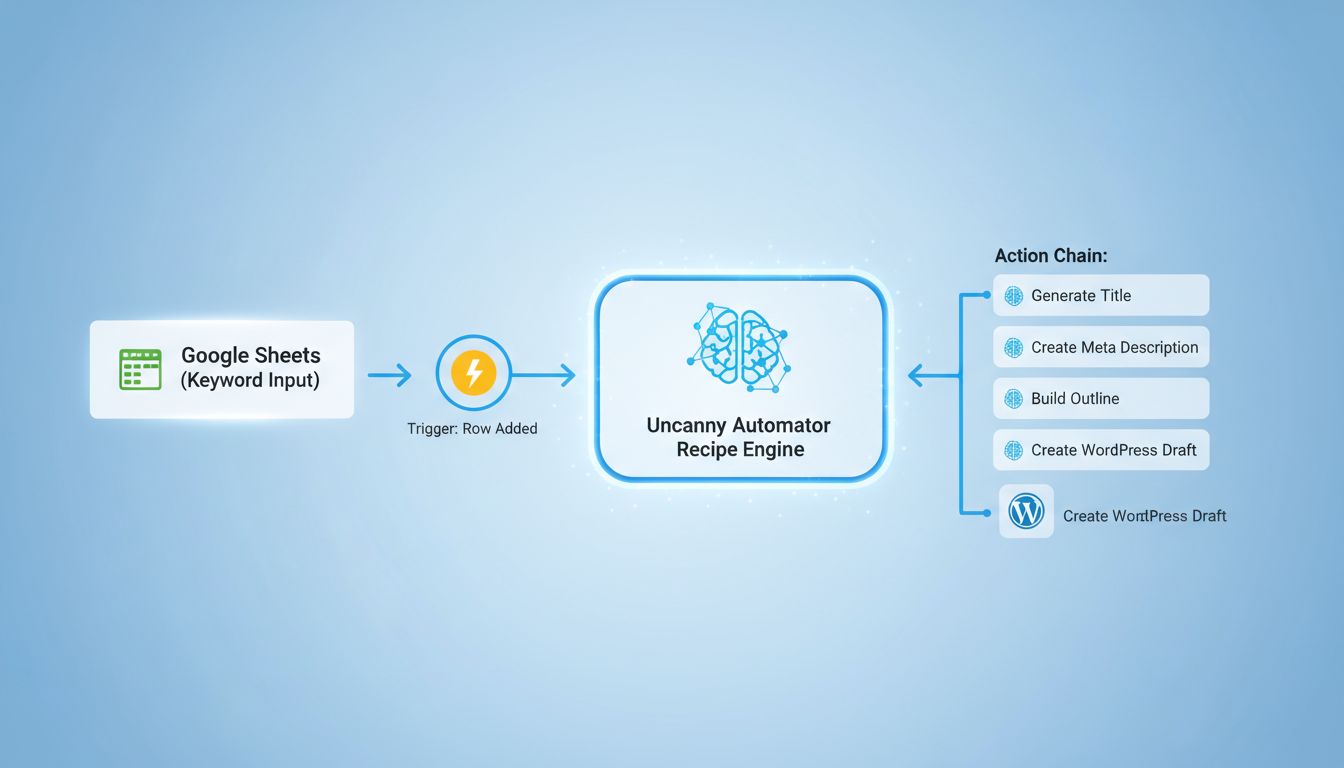
Build Your Keyword-to-Draft Recipe in Uncanny Automator
Open Uncanny Automator and create a new recipe. Name it "Keyword → Draft Post".
Set your trigger. This is where the automation starts. If you're using a tool like Spectre to feed keywords into a spreadsheet, choose "When a row is added to Google Sheets" or "When a new post is created in a specific category" (if you use a category as a keyword queue). For a simpler start, use the "Run now" trigger to test manually.
Add your action chain. This is your content assembly line:
-
Generate a post title. Add an OpenAI action: "Use a prompt to generate text with the GPT model". Your prompt: "Create a compelling, SEO-friendly blog post title for the keyword: {{trigger_field}}". Store the output in a variable like
post_title. -
Generate a meta description. Another OpenAI action. Prompt: "Write a meta description under 160 characters for a post titled '{{post_title}}'". Store as
meta_desc. -
Generate a post outline. Prompt: "Based on the keyword '{{trigger_field}}', create a detailed outline for a 1500-word blog post with H2 and H3 headings. Focus on practical steps and examples." Store as
outline. -
Draft the post body. Use the outline variable in your prompt: "Write a complete blog post following this exact outline: {{outline}}. Write in a direct, practical tone. Include specific tool names and real workflow steps." This generates the full content.
-
Create a WordPress post. Add a "Create a post" action. Map your variables: Title =
post_title, Content =post_body, Status = "Draft". Set the meta description via a custom field if your SEO plugin supports it.
Test this recipe with one keyword. Check that each step populates correctly and the draft appears in your WordPress admin.
Add Image Generation, But Control the Cost
Most AI image plugins let you generate a featured image inside the same recipe. The cost difference matters here.
Stable Diffusion API via Hotpot starts at $0.002 per image. Midjourney's Basic plan is $10/month for roughly 200 fast images. For a blog publishing daily, Stable Diffusion's pay-per-use model is usually cheaper unless you specifically need Midjourney's style.
In Uncanny Automator, add an image generation action after the post is created. Use the post title as the prompt seed. Set it as the featured image automatically.
The Non-negotiable Rule: Never Auto-Publish
Your final action must always save the post as "Draft" or "Pending Review". No automation should ever have "Publish" permissions.
This is your quality gate. It forces a human to review tone, check for factual accuracy, add personal experience, and make sure the content actually sounds like you. Only 2.5% of new pages are pure AI with no human editing, the successful ones are mixed. Your system should work the same way.
Connect Your Keyword Source
If you're using an external keyword research tool like Spectre, Ahrefs, or DataForSEO, configure the trigger to listen for new entries. Many tools can export to Google Sheets or push to a custom WordPress endpoint via API.
For now, keep it simple. A manual list in a Google Sheet or a dedicated "Keyword Queue" category in WordPress works fine. When new input arrives, the chain fires.
Once this recipe runs reliably, you've stopped doing this manually. You're not just using a WordPress AI content generator, you've built a pipeline that actually scales.
Step 5: Monitor, Optimise, and Decide to Scale
Your automated pipeline is running. That's a technical win. Now you need to figure out if it's a business win.
Automation without measurement is just a faster way to waste money.
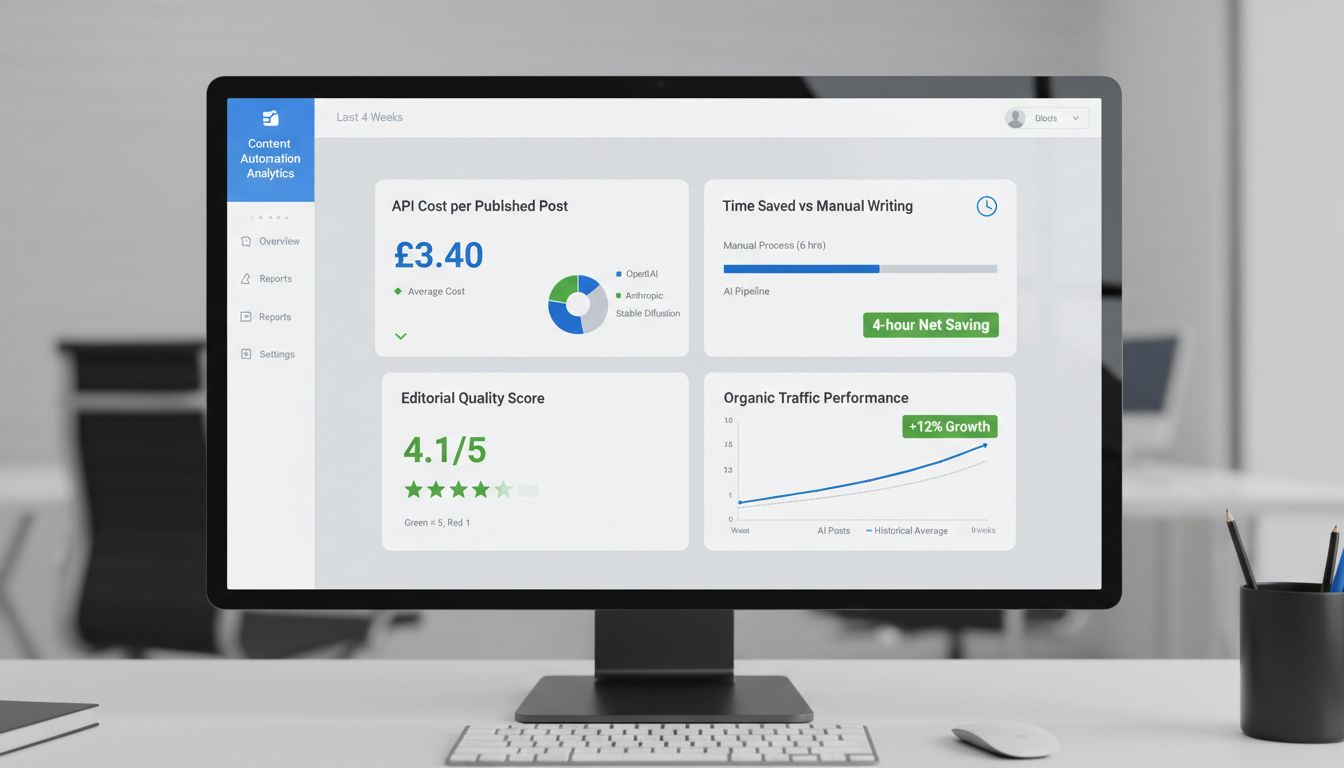
Start by defining four operational KPIs. Track them weekly.
-
API cost per published post. This isn't just your OpenAI or Anthropic bill. Include image generation costs from Stable Diffusion or Midjourney. Calculate it: total monthly API spend ÷ number of published posts. If it's creeping above £5 per post, you're probably over-using expensive models for simple tasks. Switch to something cheaper like GPT-4o-mini for drafts.
-
Time saved versus manual writing. Measure the clock time from keyword to published post in your old process. Compare it to the new pipeline. If the AI draft saves you 4 hours of writing but you spend 2 hours editing, your net saving is 2 hours. That's your real number.
-
Editorial quality score. Subjective, yes, but you can standardise it. Create a simple 1–5 rating for each post after human edit: 1 = unusable, 3 = acceptable, 5 = excellent. Track the average. If it consistently drops below 3, your prompt templates need work.
-
Organic traffic performance. Compare traffic from AI-assisted posts to your site's historical average for similar topics. Use Google Analytics or your SEO tool. Look at sessions, not just clicks. If AI posts underperform by more than 20%, the content lacks the depth that actually ranks.
Look at this data monthly. You're trying to answer three questions: Is the human editing time acceptable? Is the cost-per-post within budget? Are the posts performing?
All three "yes" and you have a viable system. One "no" and you have a bottleneck to fix before you even think about scaling.
Scaling doesn't mean removing the human editor. It means increasing the frequency of your automated workflow. Double your posting schedule from twice a week to four times a week, then watch the KPIs again. Does cost-per-post stay stable? Does quality hold? If it does, go further.
Most guides stop here. They treat the WordPress AI content generator as the whole solution. It's not. It's the execution engine.
The strategic layer is missing: deciding which keywords to target, analysing content gaps, writing briefs that actually convert.
That's where a platform like Spectre fits in. It automates the upstream strategy, continuous keyword research via DataForSEO, SERP analysis to understand what ranks, and AI-generated briefs that feed your WordPress pipeline. Your plugin writes the post. Spectre figures out the "why" and "what" that makes the "how" worth anything. It's the part that ensures your automated content isn't just volume, but targeted volume that actually grows organic traffic.
74.2% of new pages contain AI-generated content, but only the ones with a clear strategic foundation get traction. Your monitoring proves the pipeline works. Your decision to scale, backed by that data, proves it's worth investing in. The last step is connecting that pipeline to a system that ensures every post is targeting a real opportunity.
Common Mistakes That Will Break Your System
Your automated content pipeline is running. That's when the failures nobody mentions in tutorials start showing up, the ones that cost you money, time, or your site's security.
Mistake 1: Storing API Keys Insecurely on Shared Hosting
Most plugins store your OpenAI or Anthropic API keys in your WordPress database. On shared hosting, that database is often accessible to other accounts on the same server.
WordPress 7.0's Connectors API, for example, stores keys without encryption by default. A compromised key means someone else runs up your bill. I've seen invoices for thousands of pounds from a single leaked key. Never rely on plugin defaults, use environment variables or a dedicated secrets manager if your host supports it.
Mistake 2: Relying on WP-Cron for Time-Critical Publishing
WP-Cron only triggers when someone visits your site. If traffic dips overnight, your scheduled 8 AM post won't publish.
For any reliable automation, disable WP-Cron (define('DISABLE_WP_CRON', true);) and set up a real server-side cron job to hit wp-cron.php every 15 minutes. Non-negotiable for production systems.
Mistake 3: Skipping the Human Editorial Layer
Only 2.5% of new pages are pure AI with no human editing. The 71.7% that actually succeed are human-AI mixes.
Publishing raw output from your wordpress ai content generator is a fast way to produce thin, repetitive content that Google's algorithms are increasingly trained to detect. Your workflow needs a mandatory draft status and editorial review step. No exceptions.
Mistake 4: Ignoring API Spending Limits
Automation recipes can loop. A poorly configured Uncanny Automator action might re-trigger every time a post is updated, generating infinite content and draining your credits.
Set hard spending limits at the API provider level, both OpenAI and Anthropic offer this. Then check your token usage dashboard weekly.
Mistake 5: Forgetting FTC Disclosure for Commercial Content
If you're using AI to generate product descriptions, reviews, or anything that could influence a purchase, the FTC requires disclosure. Not a vague guideline, enforceable.
A simple "This description was created with AI assistance" is enough. Skip it and you're risking regulatory action and burning user trust, which is the opposite of what you're trying to build.
Conclusion
Successful AI content automation isn't about installing a plugin and pressing go. It's a system built on a secure technical foundation, controlled costs, and a human editorial layer you can't skip.
The data is pretty clear on this: 71.7% of new pages are human-AI mixes [Source: thestacc.com]. Pure automation without oversight doesn't drive results.
Your choice of plugin dictates your operational flexibility. Prioritize ones that let you bring your own API keys, that's how you control costs and model selection.
Automation without monitoring is a liability. Track token usage, image API costs, and the organic traffic impact of your generated content before you even think about scaling.
Start by auditing your WordPress environment against the prerequisites checklist. Pick one plugin, AI Engine or Uncanny Automator are solid starting points, and test it with a single, cost-capped API key.
Focus entirely on mastering the human-in-the-loop workflow for a handful of posts first. Automate later.
For the strategic layer, deciding what to write and why, a dedicated tool like Spectre can research keywords and craft briefs to feed into your wordpress ai content generator workflow once it's actually working.