April 16th, 2026
SEO Studio Tools: A Comprehensive Guide for Automated Content Workflows
 WD
WDWarren Day
You've got Semrush for keywords, Surfer for optimisation, Ahrefs for backlinks, and a CMS that stubbornly resists automation. You're drowning in tabs and manual CSV exports, not scaling your content.
The problem in 2026 isn't a lack of seo studio tools. It's a surplus of them, operating in painful isolation.
The real challenge is architectural, not informational. Most guides just list tools; they don't show you how to wire them into a resilient, API-driven system that runs without you. I've seen this from both sides, having built Spectre, an AI-powered SEO automation platform that integrates directly with DataForSEO for keyword research and SERP analysis, I've spent years as an engineer stitching these systems together for media companies, and now as a founder whose clients need workflows that actually scale.
Effective SEO automation today is less about which individual tools you pick and more about how you architect them into something coherent. Nearly 70% of businesses already report higher ROI from AI in SEO, according to [Source], but that ROI only shows up when your tools talk to each other, not when they're sitting in separate browser tabs doing nothing.
Here's what this guide actually covers: auditing your current stack of seo tools free and paid, designing a phased automation roadmap based on your team's size and budget, and building workflows that can cut manual effort on routine tasks by 70-80%. We're not doing a tool list. We're doing system architecture, the blueprint that turns a collection of apps into a content engine.
The State of Play: Why 'SEO as Usual' Is a Dead End in 2026
SEO isn't dead, but it's splitting in two. Traditional keyword-based SEO still drives commercial intent queries. Meanwhile, AI Overviews and generative search are eating informational traffic at an alarming rate, generative AI traffic grew 796% between 2024 and 2025. If your strategy still revolves around chasing 10 blue links, you're fighting over a shrinking slice.
This isn't a forecast. It's already happening. AI-written pages now make up over 17% of top Google results, and nearly 70% of businesses report higher ROI from AI in SEO. The playbook has forked. You now need to optimise for two distinct engines: the traditional search index and the generative models powering AI Overviews.
That's where Generative Engine Optimization (GEO) comes in. It's focused on earning citations within AI-generated answers, and the numbers are hard to ignore: companies implementing GEO report 6×–27× higher conversion rates from AI-sourced traffic. Sitting this one out means handing a high-intent channel to competitors who won't.
Automation, in this context, isn't about efficiency. It's about survival. You can't manually track and create content at the speed this dual landscape demands. The tab-switching, CSV-exporting workflow of 2022 doesn't scale. Whether you're working with seo tools free or a paid stack, what matters isn't which seo studio tools you have, it's whether they're wired together into something that actually runs.
H2 Defining Modern SEO Studio Tools: Beyond Single-Purpose Apps
When someone searches "What is an SEO studio tool?", they're not looking for a single application. They're looking for a production environment. The word 'studio' implies a workshop where raw materials become finished products, in this case, keywords become ranking pages.
The old model was buying Ahrefs for backlinks, Surfer for content, and screaming at your CMS. You'd manually copy-paste data between tabs, building a fragile, unscalable process. That's not a studio. It's a pile of disconnected instruments.
A modern SEO studio tool is the integrated system of specialised applications, APIs, and middleware functioning as a unified engine. Not a collection of subscriptions, but a consciously architected stack where data flows from keyword research to SERP analysis to content optimisation and into publishing via automated workflows. Tool selection has to prioritise integration needs and API capabilities, not just headline features.
I learned this the hard way building Spectre. The biggest technical hurdle wasn't the machine learning models, it was designing the data pipeline between the keyword API (DataForSEO), the clustering logic, and the CMS webhook. That orchestration layer is the studio. That's what makes your tools actually talk to each other.
This guide is your manual for building that. We'll move from buying tools to architecting a system where 70-80% of routine tasks run without you, whether you're working with seo tools free or a paid stack. The goal is getting out of the weeds so you can focus on strategy, the part that actually requires a human.
The Three-Layer Automation Stack: Data, Orchestration, Execution

Most teams treat seo studio tools as a collection of apps. That's not how you build a system. You need an architecture. Every SEO automation platform I build runs on three layers: Data, Orchestration, and Execution. Each has a distinct job, and keeping them separate is what stops the whole thing collapsing into an unmaintainable mess.
The Data Layer (The 'What')
This is your source of truth. Raw intelligence lives here. You're pulling from Ahrefs or Semrush APIs for keyword and backlink data, Google Search Console for performance, DataForSEO for SERP analysis, and your own analytics.
The key is treating these as centralised, versioned data sources. Don't let your orchestration logic make live API calls to Ahrefs for every decision, that's slow, expensive, and fragile. Schedule batch jobs to fetch and store data in a database your orchestration layer can query. Data collection is a batch job. Decision-making is a separate service. That separation is the first rule of scaling.
The Orchestration Layer (The 'How')
This is the brain. It fetches enriched data from Layer 1, processes it, and decides what happens next. Workflow engines like n8n (my preference), Make, or Zapier live here. Enterprise setups often swap these for a custom microservice. This layer handles the heavy lifting: keyword clustering, prioritisation scoring against your domain rating, competitive gap analysis, and triggering the right execution workflow.
This is also where most projects fall apart. Teams try to do everything in Zapier, hit API rate limits, and end up with spaghetti logic nobody can debug. A proper orchestration layer, n8n in particular, which typically needs a PostgreSQL backend for workflow state, gives you resilience and observability. You can see exactly why a keyword was rejected or a brief was queued. That visibility matters more than people realise until something breaks at 2am.
The Execution Layer (The 'Where')
This layer receives precise instructions from orchestration and manifests them in the real world. Tools here include CMS APIs (WordPress REST API, Webflow, Contentful), automated publishing platforms like Sight AI, and edge deployment tools like RankSense for site-wide changes. Its job is singular: take the formatted output, a blog post JSON, a meta tag update, and publish it reliably.
Here's a concrete workflow:
- Data: A nightly n8n job fetches 'Questions' report data from the Ahrefs API.
- Orchestration: n8n clusters these questions by topic, scores each cluster based on our Domain Rating (33) versus the top 10's average DR, and selects the highest-opportunity topic.
- Execution: n8n sends a structured content brief to Sight AI via its API. Sight AI generates a draft, fact-checks it, and publishes directly to our Webflow site via its REST API, then pings IndexNow for instant indexing.
When your Webflow API goes down, your orchestration workflow pauses cleanly, it doesn't lose the keyword data that cost $2 to pull from Semrush. That's the difference between a hobbyist script and a system you can leave running for months without touching. Whether you're using seo tools free or a paid stack, this architecture is what turns a scattered process into a reliable pipeline.
The Core Toolkit: 5 Essential Categories for 2026
Now we map that three-layer architecture to actual software. This isn't about collecting apps, it's about covering functional categories. A gap in any one of them creates a manual bottleneck that breaks the whole chain.
1. Research & Intelligence
Your data layer's primary source. Tools like Semrush and Ahrefs exist to answer one question: what are people searching for, and who's winning? The real value isn't the dashboard, it's the API, which gives you programmatic access to databases of over 26 billion keywords [Source: eesel.ai]. You can't automate what you can't measure. Without a reliable, API-first intelligence source, your orchestration layer has nothing to work with.
2. Content Optimization & Creation
These tools sit at the intersection of data and execution. Surfer SEO (from $89/month) and Clearscope ($170-$1,200/month) [Source: gomega.ai] take raw keyword and SERP data and turn it into actionable briefs and graded drafts. Their real job is closing the loop between research and a publish-ready asset, and increasingly, making sure content meets AI Overview criteria, not just traditional ranking signals.
3. Technical Audit & Monitoring
Screaming Frog ($279/year) and ContentKing automate the crawl, flagging broken links, indexing issues, and Core Web Vitals problems before they hit rankings [Source: eesel.ai]. For automation purposes, the value is bulk data extraction and scheduled monitoring. No manual site reviews, just alerts when something breaks.
4. Workflow Orchestration
This is the orchestration layer itself. n8n (open-source) or Zapier are the glue connecting your other tools via APIs, with conditional logic baked in, if ranking drops, refresh content. They hold the business rules of your SEO process. Choosing one isn't really about features; it's about whether it can reliably execute multi-step workflows without falling over.
5. AI Agents & Specialized Automation
The newest category, and the one moving fastest. Tools like Sight AI or RankYak ($99/month for unlimited articles) [Source: rankyak.com] aren't just software, they're automated workers that can run entire sequences: research trending question → draft answer → format for CMS → publish → submit to IndexNow. This is where you stop automating tasks and start automating entire content production lines.
| Category | Example Tools | Core Job-to-be-Done | Ideal For | Approx. Cost/Month |
|---|---|---|---|---|
| Research & Intelligence | Semrush, Ahrefs, DataForSEO API | Provide search volume, difficulty, and competitor data via API. | Teams needing scalable data sourcing. | $100 - $500+ |
| Content Optimization | Surfer SEO, Clearscope | Translate SERP data into content briefs & real-time optimisation scores. | Writers & editors ensuring E-E-A-T alignment. | $89 - $1,200 |
| Technical Audit | Screaming Frog, ContentKing | Crawl site to find health issues & extract data at scale. | Developers & technical SEOs. | $25 (Frog) - $500+ |
| Workflow Orchestration | n8n, Make, Zapier | Connect APIs with logic to automate multi-step processes. | Anyone building the system. | $0 - $100+ |
| AI Agents | RankYak, Sight AI, Custom GPTs | Execute complex, multi-step tasks (research->write->publish). | Teams scaling programmatic SEO. | $99 - Custom |
Audit your current stack against these five categories. Strong in research but no orchestration? You're still moving data by hand. Have an AI writer but no intelligence source? You're optimising blind. Whether you're running seo tools free or a paid stack, all five need to be covered before anything runs itself.
Tool Deep Dives: Matching Solutions to Your Stage & Budget
Having the right categories is one thing. Picking the wrong tools within them because they don't match your domain rating or budget is how most teams burn money. Your stack should evolve with your authority and traffic, not ahead of it.
The Solo Marketer / Beginner (Bootstrapped)
Profile: DR under 30, budget under $150/month. You're probably a founder or a team of one. The goal isn't competing for head terms, it's building topical authority through long-tail content.
Keep the stack minimal. Start with Ahrefs Webmaster Tools (free) for basic site health plus the full Google suite (Search Console, Analytics, Looker Studio). For keyword research and content optimisation, one tool is enough, Surfer SEO's Lite plan ($89/month) or Semrush's Guru tier on a trial. Use Zapier's free tier to connect your CMS for simple publishing triggers.
This is also the practical answer to "Is SEO Studio free?" At this stage, your seo studio tools setup is a collection of free and low-cost tiers working together, not a single monolithic app. And honestly, that's fine. seo tools free options like Search Console and Ahrefs Webmaster Tools cover more ground than most beginners realise.
The critical mistake here is overspending. A DR 33 site has no business paying for an enterprise keyword gap tool. Put that money toward a content optimisation tool to dominate long-tail clusters where you can actually rank.
The Scaling Team / Agency (Growth-Focused)
Profile: DR 30-60, budget $300-$1,000/month, publishing 5-50 articles monthly. You have shared seats and need workflow consistency.
At this stage, API access stops being optional. Upgrade to Semrush Pro for shared team access and its API. Self-host n8n on a basic VPS (4GB RAM, roughly $20/month) to orchestrate workflows between keyword research, content briefs, and your CMS. Integrate the Surfer API or Clearscope ($170+/month) directly into the editorial process. Screaming Frog ($279/year) earns its keep during any site migration.
The ROI math here is simple: hours saved multiplied by your hourly rate, minus the tool cost. Saving 20 hours a month at $50/hour is $1,000 in recovered time. A $300 tool stack nets $700 monthly. That's also the point where 70-80% of routine SEO tasks become automatable.
The Enterprise (Performance-Obligated)
Profile: DR 60+, budget $2,000+/month, with governance and compliance requirements. You're managing brand risk across multiple regions and need unified reporting.
Tool selection at this level shifts away from raw capability toward governance and scalability. Enterprise platforms like BrightEdge or Conductor justify their cost through workflow automation, AI recommendations, and cross-regional reporting. A headless CMS (Contentful or Strapi) with a solid API ecosystem handles omnichannel publishing. For technical changes at scale, edge SEO tools like RankSense (deployed on Cloudflare) let you update meta tags and schema across thousands of pages without touching core code.
The investment isn't just tooling, it's dedicated infrastructure for orchestration plus formal AI governance protocols covering data privacy and editorial compliance. Total cost of ownership, including integration security and audit trails, matters more than the subscription line item.
H2 What to Automate First: Applying the 80/20 Rule to SEO Tasks
The 80/20 rule in SEO is simple: 80% of your results come from 20% of your efforts. Applied to automation, that means identifying the most repetitive, high-impact manual tasks and hitting those first. Don't try to automate everything at once. Start with work that's both tedious and critical.
As of 2026, 70-80% of routine SEO tasks can be effectively automated. Your job is finding that 20% of effort that drives 80% of the value. Here's the priority order, ranked by automation ROI.
1. Rank Tracking & Performance Reporting Manually pulling data from Google Search Console, Google Analytics, and your seo studio tools into a spreadsheet is pure overhead. Automate the daily aggregation instead. Use n8n or a dedicated reporting tool to pipe everything into a single Looker Studio dashboard. You get instant visibility without the weekly two-hour data wrangle.
2. Content brief generation Taking a target keyword and SERP analysis and turning it into a structured outline is a perfect automation candidate. A workflow can pull keyword difficulty, search intent, and competitor outlines from DataForSEO or Ahrefs, then format everything into a standardised brief in your project management tool. That eliminates hours of manual research per article.
3. Technical Health Monitoring Schedule weekly automated crawls with Screaming Frog or ContentKing to flag 404 errors, speed regressions, or indexation blocks. Set alerts for critical issues. Proactive monitoring stops small problems from becoming traffic catastrophes.
4. Content Upload & Basic On-Page Setup Once a draft is approved, automate the push to your CMS. Use the WordPress REST API or Webflow API to create the post, apply the correct category, and set the meta title and description from the brief. Removes the copy-paste drudgery and cuts human error.
5. Backlink Monitoring & Alerting Tools like Ahrefs already track new backlinks. The automation opportunity is qualification. Build a simple workflow that filters new mentions by domain authority and relevance, routing only the high-potential ones to an outreach list and ignoring the spam.
The counterintuitive part? Don't start with content generation. The ROI on automating the framework around content, research, briefing, publishing, is higher and less risky than fully automating the writing itself. And if you're using seo tools free options like Search Console at this stage, that's completely fine. Get the system right first. The writing can come later.
H2 Building Your First Automated Workflow: Two Blueprints
Theory is useless without implementation. Here are two concrete blueprints I've deployed for clients, moving from manual chaos to automated pipelines.
Blueprint 1: The Content Production Line (For Beginners)
This workflow automates the journey from keyword idea to drafted post, eliminating the tab-switching hell between research, briefing, and your CMS.
- Seed & Trigger: Start manually with a seed keyword in a Google Sheet. A Zapier or Make automation watches for a new row and triggers.
- Keyword Expansion: The automation calls the Semrush API (using their
keywords_dataendpoint) to fetch related keywords, search volume, and difficulty. This data populates your sheet. - Brief Generation: Use a Google Apps Script (or a tool like Coefficient) to take the primary keyword and call the Surfer SEO or Clearscope API. It fetches top-ranking competitors, suggested structure, and target keyword density, auto-generating a content brief in a new sheet tab.
- Draft Creation: The brief is sent via email to a human writer, or for simple informational posts, to the OpenAI API (using a structured prompt) for a first draft.
- CMS Draft: Finally, the automation uses the WordPress REST API (
POST /wp-json/wp/v2/posts) to create a draft post. The friction point here is authentication, use an application password, not a user login. Map your brief fields totitle,content,status: draft, and custom fields for your brief data.
The goal isn't fully automated content, but a zero-touch pipeline from idea to a draft ready for human polish.
Blueprint 2: The Programmatic SEO Engine (For Scaling Teams)
This is for teams needing to scale content around trending questions and data. It uses n8n as the orchestration brain.
- Data Harvest: An n8n scheduler triggers weekly, calling the Ahrefs API for the "Questions" report in your core topic. It extracts hundreds of real user queries.
- Clustering & Prioritisation: n8n uses a simple TF-IDF or embedding model (via the OpenAI API) to cluster questions by semantic similarity. It then scores each cluster by aggregate search volume and keyword difficulty, automatically discounting opportunities where your domain rating is too low to compete.
- Structured Brief Build: For the top cluster, n8n constructs a data-rich brief: primary title (from the most common question), H2s (from sub-questions), and a list of exact questions to answer sourced from the "People also ask" SERP feature.
- AI Writing Execution: This structured brief is sent to an agent-based platform API like Sight AI. The key is sending structured data, not a loose prompt, to control output quality.
- Publish & Index: n8n receives the HTML, pushes it to a headless CMS (like Contentful) or Webflow via their REST API, sets the slug, meta title, and description. The final step is a call to the IndexNow API to ping search engines immediately.
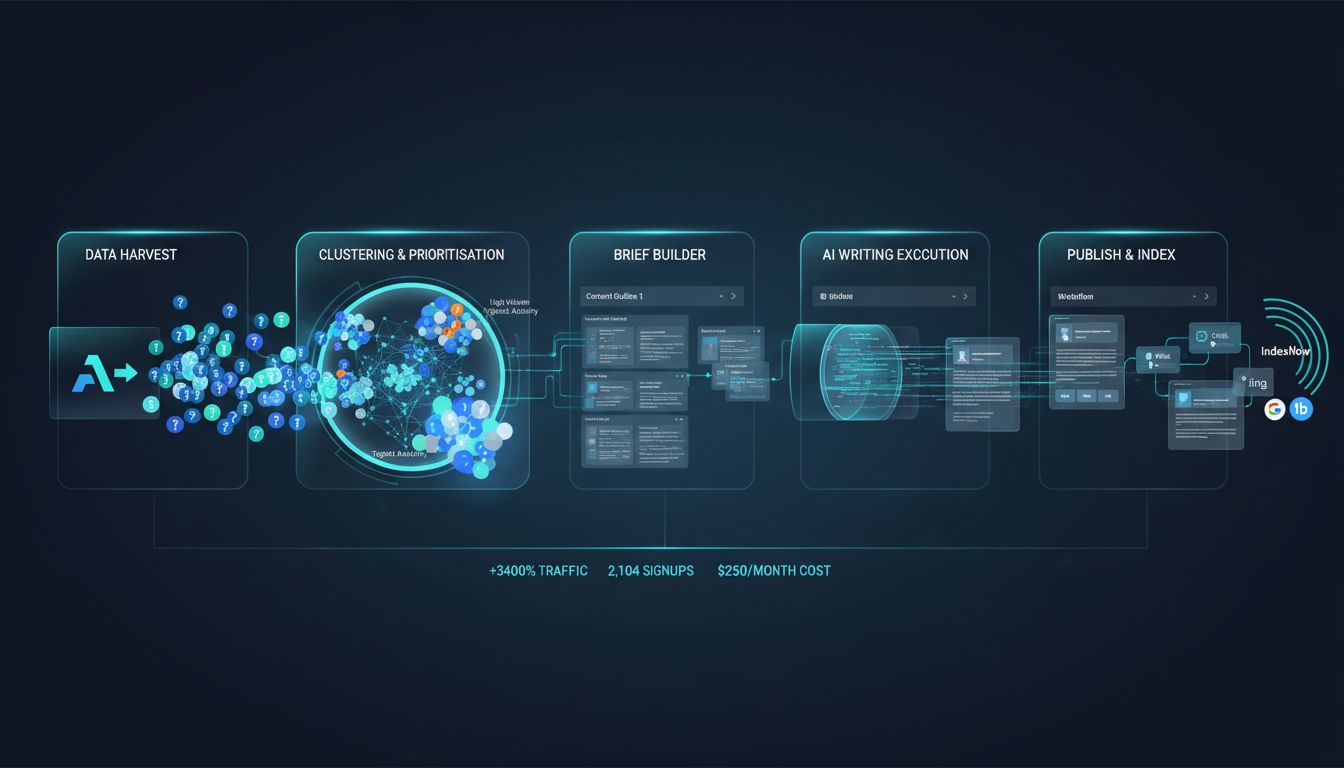
This is the engine behind the programmatic SEO case study that increased monthly signups from 67 to over 2,100 in 10 months. It's not guessing, it's responding to proven, clustered search demand. Whether you're running seo studio tools at scale or piecing together seo tools free options, the logic is the same: the system works because it's built on real query data, not assumptions.
One critical technical gotcha applies to both blueprints: data transformation. APIs return JSON; your CMS expects HTML. Your orchestration layer (n8n, Make, a custom script) must handle that conversion. Don't try to make your AI writer output JSON-LD for schema, add that in a separate execution step after the HTML is generated.
The Human in the Loop: Governance, QA, and AI's Limits
So you've built the pipeline. The AI writes, the CMS publishes, the APIs report. Now the uncomfortable question: what happens when it goes wrong?
Automation handles execution, not judgment. The moment you treat AI as a solution rather than a component, you risk brand damage, factual inaccuracies, and compliance failures.
Let's answer "Can ChatGPT do SEO?" directly: no. It can't. It's genuinely useful for ideation, drafting, and data synthesis, but it's blind to strategy and accuracy. It doesn't know your commercial goals, your industry's regulatory landscape, or whether a cited statistic is five years out of date. Your system provides the guardrails. Humans provide the steering.
The three non-negotiable human roles
Automation doesn't eliminate jobs, it redefines them. The three roles that survive in an AI-driven workflow are:
- The Strategist defines the "why." They interpret the data the system collects, spot market shifts, and adjust the AI's instructions. When traffic to a cluster of pages decays, the strategist decides whether to update, consolidate, or redirect. Not the bot.
- The Editor/Governor is your quality and brand gatekeeper. They check factual accuracy, maintain voice, and enforce compliance. I've seen AI confidently generate case studies referencing non-existent clients. An editor catches that.
- The System Architect maintains and improves the automation stack itself, handling API deprecations, tuning prompts based on performance, integrating new data sources. It's a continuous engineering role, not a one-time setup.
Implementing your governance checklist
For every piece of automated content, run a mandatory three-step review before publication:
- Editorial/SME review: Fact-check claims, verify data sources, assess readability.
- SEO review: Confirm on-page optimisation aligns with current SERP features and intent.
- Legal/compliance review: Flag unsubstantiated claims, missing disclosures, or regulatory red flags.
This isn't overhead. It's insurance.
AI-specific governance: the practicalities
Beyond editorial checks, you need technical governance.
Data privacy first: ensure your AI tools anonymise data and comply with GDPR/CCPA. Don't feed customer PII into a public model. Then audit for bias, if your AI only surfaces topics popular with a certain demographic, your content strategy will quietly reflect that. And on security: use API keys with minimal permissions, and never paste proprietary strategy documents into a public ChatGPT session.
The limit is clear. AI excels at scaling the "how." It can't define the "why." Whether you're running seo studio tools at enterprise scale or stitching together seo tools free options on a tight budget, your governance framework is what makes the whole thing trustworthy.
H2 Common Pitfalls and How to Avoid Them
The final lesson from building SEO automation systems is learning from failure. I've watched teams sink months into these pipelines only to hit the same predictable walls. Here are the seven most common mistakes and how to sidestep them.
Pitfall 1: Ignoring Continuous Improvement Search algorithms and AI results evolve quarterly. Your static automation rules won't. A workflow that worked in Q1 2026 might be obsolete by Q3. Fix: schedule a mandatory quarterly review. Audit your automated content's performance, check if your keyword clustering logic still matches SERP intent, and update your AI prompts based on what's actually ranking. Source: Dataopedia.com
Pitfall 2: Underestimating Integration Failures APIs fail. Webhooks get missed. A data-sync break between your keyword tool and CMS can mean publishing 50 articles targeting the wrong terms. Fix: build monitoring into your orchestration layer. Use n8n's built-in error workflows to trigger Slack alerts on failure, and run a weekly data integrity check.
Pitfall 3: Over-reliance on Legacy CMS or Plugins If your CMS lacks a robust REST API, you've built your automation on sand. Many teams get stuck because their WordPress theme or proprietary platform can't be controlled programmatically. Fix: prioritise API accessibility in your tech stack. For existing sites, tools like RankSense let you deploy meta tags and schema at the edge via Cloudflare, bypassing CMS limitations entirely.
Pitfall 4: Choosing Tools on Features Alone The shiny dashboard demo hides the true cost: integration complexity. That "all-in-one" platform might need 40 hours of developer time to connect to your data warehouse. Fix: always evaluate Total Cost of Ownership. Map the tool to your three-layer stack and ask, "How will this connect to my orchestration layer? What's the monthly cost plus the dev hours to maintain it?"
Pitfall 5: Using Zapier for High-Scale Programmatic SEO Zapier is fine for simple, low-volume tasks. For generating and optimising thousands of data-driven pages, its per-task pricing explodes and its speed becomes a bottleneck. Fix: use n8n (self-hosted) or a purpose-built agent like Sight AI for complex, data-heavy workflows. The research indicates a shift away from stitched-together Zapier flows for programmatic work. Source: Gomega AI
Pitfall 6: Skipping Governance Automation without oversight is a brand and compliance risk. Letting an AI publish directly to your blog without an editorial checkpoint is how you end up with factually dubious content. Fix: implement the governance checklist from the previous section. No exceptions. AI handles execution, humans own strategy and quality.
Pitfall 7: Assuming Automation Fixes Bad Strategy This is the cardinal sin. Automating a flawed content strategy, targeting ultra-competitive keywords with a low Domain Rating, for instance, just produces irrelevant pages faster. Garbage in, garbage out, at scale. Fix: nail your foundational SEO strategy first. Understand your domain's competitive position, identify your true content angles, and validate that a manual process works. Then, and only then, automate it.
Conclusion
Stop thinking about seo studio tools as a shopping list of apps. Effective SEO automation in 2026 is about building a coherent system: a Data layer that feeds into Orchestration that drives Execution. Your site's Domain Rating dictates which keywords and automation strategies are actually viable. Automate workflows that match your competitive reality, not industry hype.

The highest ROI comes from automating repetitive, data-heavy tasks first: rank tracking, reporting, and content brief generation. That said, human oversight for strategy, governance, and quality isn't optional, it's what keeps automation scalable and safe. Start with a 30-day plan focused on one workflow. Perfect it, measure the time saved, then expand from there.
Whether you're working with seo tools free or paid, your next step is the same: pick one manual SEO task you did this week, tracking keywords, building a content brief, checking for 404s, and map out how data moves from start to finish. Then find a single connection point you could automate using an API, a webhook, or a Zapier/Make/n8n workflow.
Just start with that one thing.
Frequently Asked Questions
Is SEO dead or evolving in 2026?
SEO isn't dead. It's evolving faster than most people can keep up with. The shift toward AI Overviews and generative search means optimizing for AI agents (Generative Engine Optimization) is now part of the job alongside core fundamentals. If anything, targeting intent and providing genuine value matters more than it used to, the tactics just look very different. [Source: MaximusLabs.ai]
Can ChatGPT do SEO?
Not on its own. ChatGPT is genuinely useful for ideation, outlining, and drafting when you feed it solid SEO inputs, but it can't run a technical audit, map a competitive landscape, or catch its own factual errors without someone checking its work. Treat it as a capable assistant inside your workflow, not a replacement for one.
What is the 80/20 rule for SEO?
The Pareto Principle applied to SEO: roughly 80% of your results come from 20% of your efforts. For automation specifically, that means identifying the tasks that are repetitive, data-heavy, and time-consuming, reporting, keyword clustering, content brief creation, and tackling those first. Save human effort for the strategic work that actually requires judgment.
What are the 4 pillars of SEO?
Technical foundation (crawlability, indexability, site speed), content (relevance, quality, depth), authority (backlinks, brand signals), and user experience (engagement, Core Web Vitals, intent fulfillment). A solid automation system has to support all four. Let one slip and the rest suffer for it.
What is an SEO studio tool?
Honestly, the term gets used loosely. It sometimes means an all-in-one platform, but a more useful definition is the interconnected system of specialized tools, for research, content, technical SEO, and orchestration, that you've deliberately wired together into a coherent workflow. The seo studio tools concept is less about any single product and more about the architecture you build around your actual process.
Will AI replace SEO?
No, but the role is shifting. Automation handles executional and analytical tasks well. What it can't do is set strategy, make editorial calls, govern quality at scale, or solve genuinely novel problems. SEO professionals are moving from manual execution toward system design and AI oversight, which is honestly a more interesting job, even if it requires learning new skills.